458 lines
19 KiB
Markdown
458 lines
19 KiB
Markdown
|
||
## Overview
|
||
|
||
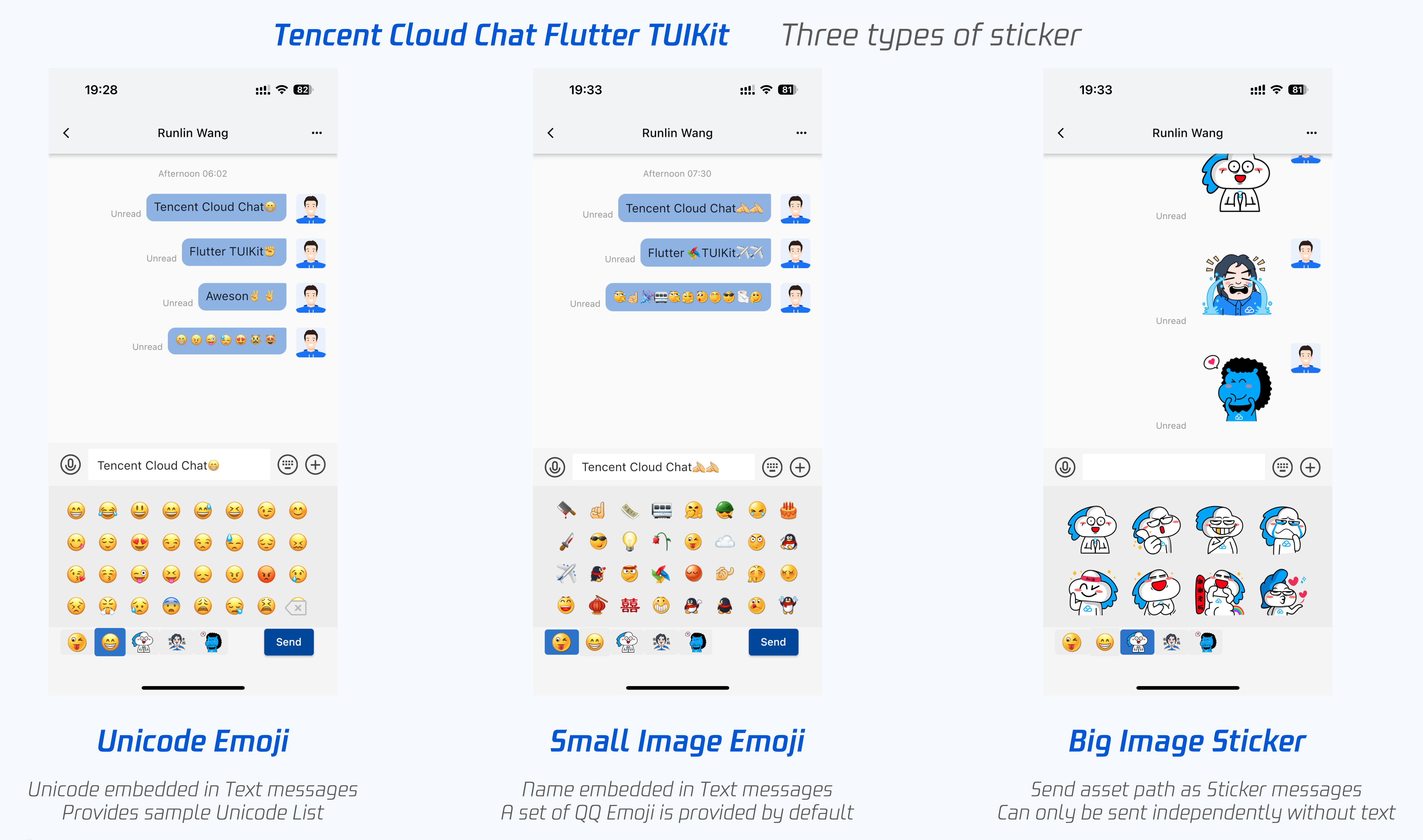
Tencent Cloud Chat Flutter TUIKit provides powerful Emoji and Sticker modules to help you customize the Emoji and Sticker sharing of your app.
|
||
|
||
Through simple configurations, you can easily choose and integrate those three types of stickers to your app.
|
||
|
||
| Sticker Type | Message Type | Embed to text | Sending content | Render | Import | Provide by default |
|
||
|---------|---------|---------|---------|---------|---------|---------|
|
||
| [Unicode](https://unicode.org/emoji/charts/full-emoji-list.html) Emoji | Text Message | Yes | [Unicode](https://unicode.org/emoji/charts/full-emoji-list.html) |[Unicode](https://unicode.org/emoji/charts/full-emoji-list.html) to Emoji can be compiled automatically by devices, while different devices or platforms have different Emoji rendering | [Unicode](https://unicode.org/emoji/charts/full-emoji-list.html) List | Sample [Unicode](https://unicode.org/emoji/charts/full-emoji-list.html) List is provided [here](#unicode) |
|
||
| Small Image Emoji | Text Message | Yes | Image name | Match local Asset image resources according to name automatically | Image stored in asset, and define `List` | A set of QQ Emoji is provided by default |
|
||
| Big Image Sticker | Sticker Message | No | `baseURL` join with image name, as asset path | Render image from asset | Image stored in asset, and define `List` | - |
|
||
|
||
|
||
|
||
Now, let's start integrating Emoji and Sticker to your app with TUIKit.
|
||
|
||
>? The usage of this module has been modified since the 1.1.0 version of [TUIKit](https://pub.dev/packages/tencent_cloud_chat_uikit). Please check all the parts in this tutorial if you upgrade the version.
|
||
|
||
## STEP 1: Customize Image Emoji and Sticker
|
||
|
||
>? **This step is optional:**
|
||
> This step is necessary only if image stickers, except default QQ emoji one, includes both small and big, are needed.
|
||
> QQ Emoji set is provided by default, and is unnecessary to import in this step.
|
||
|
||
### Import Image File to Project
|
||
|
||
Please add your image resources file to `assets/custom_face_resource/` of your project, including both small and big images.
|
||
|
||
In this directory, separate subdirectory with different sticker packages, means each Tabs on Sticker panel. Only one type of sticker is allowed in each Tab(package or subdirectory).
|
||
|
||
Name those subdirectories differently, and this name will be used as the `name` field of `CustomEmojiFaceData` and `CustomStickerPackage` in the following steps. Please allocate the name as you need.
|
||
|
||
Also, please make sure that all image resource files do not have the same name.
|
||
|
||
You can refer to our [sample project](https://github.com/TencentCloud/chat-demo-flutter/tree/main/assets/custom_face_resource), if not clear.
|
||
|
||
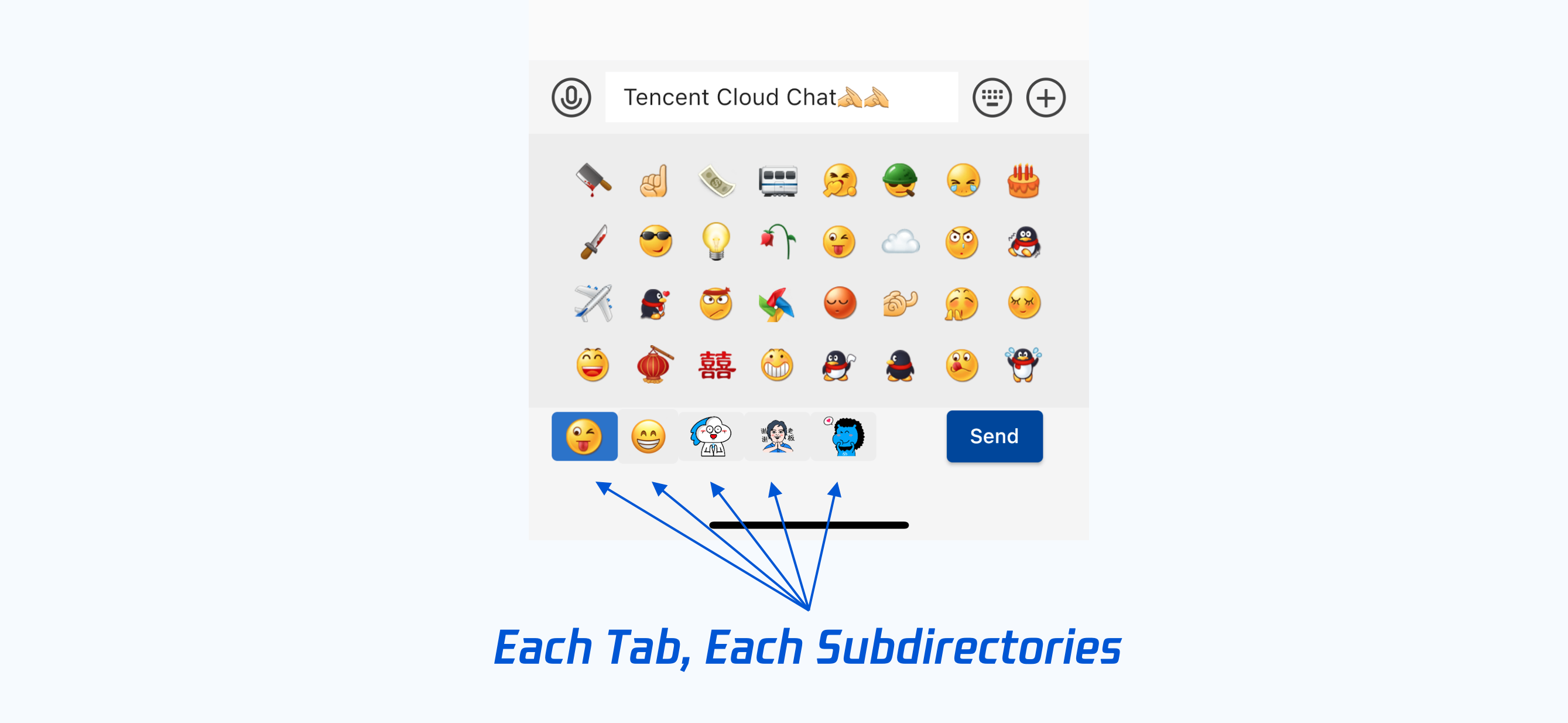
|
||
|
||
### Add assets to app
|
||
|
||
Open `pubspec.yaml`, add those following lines to `flutter` => `assets`.
|
||
|
||
```yaml
|
||
flutter:
|
||
assets:
|
||
- assets/custom_face_resource/
|
||
```
|
||
|
||
### Configure assets list
|
||
|
||
>? The sample code for this part can be found [here](https://github.com/TencentCloud/chat-demo-flutter/blob/main/lib/utils/constant.dart), mainly focused on `emojiList`.
|
||
|
||
Define a static `List<CustomEmojiFaceData>` in your project, aiming for transferring the local image assets to TUIKit, as List.
|
||
|
||
In this `List`, each item is `CustomEmojiFaceData`, while it constitutes each Tab in the sticker panel.
|
||
|
||
```dart
|
||
CustomEmojiFaceData(
|
||
{
|
||
String name, // The name of the package and subdirectory.
|
||
String icon, // The file name of the icon on the Tab.
|
||
List<String> list, // The list of the files name.
|
||
bool isEmoji //Whether it contains small image emojis, default is big image stickers.
|
||
}
|
||
);
|
||
```
|
||
|
||
Sample Code:
|
||
|
||
```dart
|
||
static final List<CustomEmojiFaceData> emojiList = [
|
||
// Small Image Emoji, embedded in text messages.
|
||
CustomEmojiFaceData(
|
||
name: '4349',
|
||
icon: "aircraft.png",
|
||
isEmoji: true,
|
||
list: [
|
||
"aircraft.png",
|
||
"alarmClock.png",
|
||
"anger.png",
|
||
// ...
|
||
]),
|
||
|
||
// Big image stickers, sent as sticker messages independently.
|
||
CustomEmojiFaceData(
|
||
name: '4350',
|
||
icon: "menu@2x.png",
|
||
list: [
|
||
"yz00@2x.png",
|
||
// ...
|
||
]),
|
||
]
|
||
```
|
||
|
||
## Step 2: Customize the Unicode Emoji List
|
||
|
||
>? **This step is optional:**
|
||
> This step is necessary only if Unicode Emoji is needed.
|
||
|
||
Define a static `List<Map<String, Object>>` of Unicode in your project, you can build it based on the [sample list we provided](#unicode).
|
||
|
||
You can add, delete and modify some items in this List, based on the official [Unicode](https://unicode.org/emoji/charts/full-emoji-list.html).
|
||
|
||
|
||
## Step 3: Cache the Emoji and Sticker to memory
|
||
|
||
>?
|
||
> - Sample code for this step [can be found here](https://github.com/TencentCloud/chat-demo-flutter/blob/main/lib/src/pages/app.dart), mainly focus on `setCustomSticker` function.
|
||
> - QQ Emoji has been embedded by default, and unnecessary to do this step.
|
||
|
||
Cache those Emoji and Stickers to global `Provider`, memory, **just after your app launched, and before the first `TIMUIKitChat` shows**.
|
||
|
||
**This steps should only be done once.** Aiming for reducing the load of memory IO, as rendering each sticker is a high frequency event, and will cost a lot.
|
||
|
||
The instance of each sticker is generated by the following `CustomSticker` class. It will show Unicode Emoji if `unicode` is not null, otherwise it shows an image.
|
||
|
||
```dart
|
||
class CustomSticker {
|
||
int? unicode; // Unicode int value。It will show Unicode Emoji if this field is not null, otherwise it shows an image.
|
||
String name; // The name of the sticker
|
||
int index; // The index of the sticker
|
||
bool isEmoji; // Whether it is a small image emoji, while a big image sticker is as default.
|
||
}
|
||
```
|
||
|
||
The instance of each Tab on sticker panel, each sticker package, is generated by the `CustomStickerPackage` class.
|
||
|
||
```dart
|
||
class CustomStickerPackage { // Each Tab on sticker panel, each sticker package
|
||
String name; // The name of this sticker package, subdirectory, and the Tab.
|
||
String? baseUrl; // Sticker package baseUrl,recommend specify as "assets/custom_face_resource/${package name}"
|
||
List<CustomSticker> stickerList; // The list of the image files name
|
||
CustomSticker menuItem; // The file name of the icon of Tab
|
||
bool isEmoji; // Whether it contains small image emojis, while big image stickers are as default.
|
||
}
|
||
```
|
||
|
||
For the classes shown above, we provide sample codes as follows, for the code you may need to write.
|
||
|
||
`Solution A` shows the usage of Unicode Emoji while `Solution B` shows the usage of image stickers. You can choose all or part of them as needed.
|
||
|
||
|
||
```dart
|
||
setCustomSticker() async {
|
||
// Define a list to store sticker packages.
|
||
List<CustomStickerPackage> customStickerPackageList = [];
|
||
|
||
// Solution A: Use Emoji Unicode list. Can be added to text messages.
|
||
// `emojiData` comes from step 2.
|
||
final defEmojiList = emojiData.asMap().keys.map((emojiIndex) {
|
||
final emoji = Emoji.fromJson(emojiData[emojiIndex]);
|
||
return CustomSticker(
|
||
index: emojiIndex, name: emoji.name, unicode: emoji.unicode);
|
||
}).toList();
|
||
customStickerPackageList.add(CustomStickerPackage(
|
||
name: "defaultEmoji",
|
||
stickerList: defEmojiList,
|
||
menuItem: defEmojiList[0]));
|
||
|
||
// Solution B: Use the image sticker.
|
||
// Please make sure `customEmojiPackage.name` is the name of the subdirectory.
|
||
customStickerPackageList.addAll(Const.emojiList.map((customEmojiPackage) {
|
||
return CustomStickerPackage(
|
||
name: customEmojiPackage.name,
|
||
baseUrl: "assets/custom_face_resource/${customEmojiPackage.name}",
|
||
stickerList: customEmojiPackage.list
|
||
.asMap()
|
||
.keys
|
||
.map((idx) =>
|
||
CustomSticker(index: idx, name: customEmojiPackage.list[idx]))
|
||
.toList(),
|
||
menuItem: CustomSticker(
|
||
index: 0,
|
||
name: customEmojiPackage.icon,
|
||
));
|
||
}).toList());
|
||
|
||
Provider.of<CustomStickerPackageData>(context, listen: false)
|
||
.customStickerPackageList = customStickerPackageList;
|
||
}
|
||
```
|
||
|
||
## STEP 4: Adding those stickers to TIMUIKitChat
|
||
|
||
>?
|
||
> - Sample code for this step [can be found here](https://github.com/TencentCloud/chat-demo-flutter/blob/main/lib/src/chat.dart), mainly focus on `renderCustomStickerPanel`, `customStickerPanel` and `customEmojiList`.
|
||
|
||
Copy the following codes to the class that contains the `TIMUIKitChat` widget directly.
|
||
|
||
```dart
|
||
Widget renderCustomStickerPanel({
|
||
sendTextMessage,
|
||
sendFaceMessage,
|
||
deleteText,
|
||
addCustomEmojiText,
|
||
addText,
|
||
List<CustomEmojiFaceData> defaultCustomEmojiStickerList = const [],
|
||
}) {
|
||
final theme = Provider.of<DefaultThemeData>(context).theme;
|
||
final customStickerPackageList =
|
||
Provider.of<CustomStickerPackageData>(context).customStickerPackageList;
|
||
final defaultEmojiList =
|
||
defaultCustomEmojiStickerList.map((customEmojiPackage) {
|
||
return CustomStickerPackage(
|
||
name: customEmojiPackage.name,
|
||
baseUrl: "assets/custom_face_resource/${customEmojiPackage.name}",
|
||
isEmoji: customEmojiPackage.isEmoji,
|
||
isDefaultEmoji: true,
|
||
stickerList: customEmojiPackage.list
|
||
.asMap()
|
||
.keys
|
||
.map((idx) =>
|
||
CustomSticker(index: idx, name: customEmojiPackage.list[idx]))
|
||
.toList(),
|
||
menuItem: CustomSticker(
|
||
index: 0,
|
||
name: customEmojiPackage.icon,
|
||
));
|
||
}).toList();
|
||
return StickerPanel(
|
||
sendTextMsg: sendTextMessage,
|
||
sendFaceMsg: (index, data) =>
|
||
sendFaceMessage(index + 1, (data.split("/")[3]).split("@")[0]),
|
||
deleteText: deleteText,
|
||
addText: addText,
|
||
addCustomEmojiText: addCustomEmojiText,
|
||
customStickerPackageList: [
|
||
...defaultEmojiList,
|
||
...customStickerPackageList
|
||
],
|
||
backgroundColor: theme.weakBackgroundColor,
|
||
lightPrimaryColor: theme.lightPrimaryColor);
|
||
}
|
||
```
|
||
|
||
### STEP 4.1: Render Small Image Emoji
|
||
|
||
>? **This step is optional:**
|
||
> - This step is necessary only if small images emoji are needed for your app, except the QQ Emoji we provided by default.
|
||
> - Unicode Emoji and small image emoji are similar, it is not recommended to integrate these two types of emoji at the same time.
|
||
|
||
- STEP 4.1(a) shows the usage of using custom small image emoji.
|
||
- STEP 4.1(b) shows the usage of using default QQ emojis.
|
||
|
||
It is recommended to choose one of them.
|
||
|
||
If you tend to use both of them, please make sure those image resource files do not have the same name.
|
||
|
||
#### STEP 4.1(a): Render custom small image emoji
|
||
|
||
Add a `List customEmojiList` field to the `build` function of the `Widget` that contains `TIMUIKitChat`, storing the list of small image emoji.
|
||
|
||
```dart
|
||
List customEmojiList =
|
||
Const.emojiList.where((element) => element.isEmoji == true).toList();
|
||
```
|
||
|
||
And transferring this list to `customEmojiStickerList` of `TIMUIKitChat`.
|
||
|
||
```dart
|
||
return TIMUIKitChat(
|
||
customEmojiStickerList: customEmojiList,
|
||
// ......
|
||
);
|
||
```
|
||
|
||
>?
|
||
> If this widget is a `StatefulWidget`, choosing to place this list to state, and execute the `where` method once, to improve the performance are recommended.
|
||
|
||
#### STEP 4.1(b): Enable QQ Emoji
|
||
|
||
Enable the `isUseDefaultEmoji` of `TIMUIKitChatConfig` from `TIMUIKitChat` to `true`. Meanwhile, a Tab shows the default QQ Emoji will occur on the left of the sticker panel.
|
||
|
||
```dart
|
||
return TIMUIKitChat(
|
||
config: TIMUIKitChatConfig(
|
||
isUseDefaultEmoji: true,
|
||
// ......
|
||
),
|
||
// ......
|
||
);
|
||
```
|
||
|
||

|
||
|
||
### STEP 4.2: Add the sticker panel to TIMUIKitChat
|
||
|
||
Transfer the function, you copied in this step, to the `customStickerPanel` field of `TIMUIKitChat`.
|
||
|
||
```dart
|
||
return TIMUIKitChat(
|
||
customStickerPanel: renderCustomStickerPanel,
|
||
// ......
|
||
);
|
||
```
|
||
|
||
That's all you need to integrate Emoji and Sticker modules to your app, with Tencent Cloud Chat Flutter TUIKit.
|
||
|
||
[](id:unicode)
|
||
|
||
## Appendix: Sample list of Emoji Unicodes
|
||
|
||
The list is for sample and presentation purposes only, you can modify it as you need.
|
||
|
||
```dart
|
||
List<Map<String, Object>> emojiData = [
|
||
{"name": "GRINNING FACE WITH SMILING EYES", "unicode": 128513},
|
||
{"name": "FACE WITH TEARS OF JOY", "unicode": 128514},
|
||
{"name": "SMILING FACE WITH OPEN MOUTH", "unicode": 128515},
|
||
{"name": "SMILING FACE WITH OPEN MOUTH AND SMILING EYES", "unicode": 128516},
|
||
{"name": "SMILING FACE WITH OPEN MOUTH AND COLD SWEAT", "unicode": 128517},
|
||
{
|
||
"name": "SMILING FACE WITH OPEN MOUTH AND TIGHTLY-CLOSED EYES",
|
||
"unicode": 128518
|
||
},
|
||
{"name": "WINKING FACE", "unicode": 128521},
|
||
{"name": "SMILING FACE WITH SMILING EYES", "unicode": 128522},
|
||
{"name": "FACE SAVOURING DELICIOUS FOOD", "unicode": 128523},
|
||
{"name": "RELIEVED FACE", "unicode": 128524},
|
||
{"name": "SMILING FACE WITH HEART-SHAPED EYES", "unicode": 128525},
|
||
{"name": "SMIRKING FACE", "unicode": 128527},
|
||
{"name": "UNAMUSED FACE", "unicode": 128530},
|
||
{"name": "FACE WITH COLD SWEAT", "unicode": 128531},
|
||
{"name": "PENSIVE FACE", "unicode": 128532},
|
||
{"name": "CONFOUNDED FACE", "unicode": 128534},
|
||
{"name": "FACE THROWING A KISS", "unicode": 128536},
|
||
{"name": "KISSING FACE WITH CLOSED EYES", "unicode": 128538},
|
||
{"name": "FACE WITH STUCK-OUT TONGUE AND WINKING EYE", "unicode": 128540},
|
||
{
|
||
"name": "FACE WITH STUCK-OUT TONGUE AND TIGHTLY-CLOSED EYES",
|
||
"unicode": 128541
|
||
},
|
||
{"name": "DISAPPOINTED FACE", "unicode": 128542},
|
||
{"name": "ANGRY FACE", "unicode": 128544},
|
||
{"name": "POUTING FACE", "unicode": 128545},
|
||
{"name": "CRYING FACE", "unicode": 128546},
|
||
{"name": "PERSEVERING FACE", "unicode": 128547},
|
||
{"name": "FACE WITH LOOK OF TRIUMPH", "unicode": 128548},
|
||
{"name": "DISAPPOINTED BUT RELIEVED FACE", "unicode": 128549},
|
||
{"name": "FEARFUL FACE", "unicode": 128552},
|
||
{"name": "WEARY FACE", "unicode": 128553},
|
||
{"name": "SLEEPY FACE", "unicode": 128554},
|
||
{"name": "TIRED FACE", "unicode": 128555},
|
||
{"name": "LOUDLY CRYING FACE", "unicode": 128557},
|
||
{"name": "FACE WITH OPEN MOUTH AND COLD SWEAT", "unicode": 128560},
|
||
{"name": "FACE SCREAMING IN FEAR", "unicode": 128561},
|
||
{"name": "ASTONISHED FACE", "unicode": 128562},
|
||
{"name": "FLUSHED FACE", "unicode": 128563},
|
||
{"name": "DIZZY FACE", "unicode": 128565},
|
||
{"name": "FACE WITH MEDICAL MASK", "unicode": 128567},
|
||
{"name": "GRINNING CAT FACE WITH SMILING EYES", "unicode": 128568},
|
||
{"name": "CAT FACE WITH TEARS OF JOY", "unicode": 128569},
|
||
{"name": "SMILING CAT FACE WITH OPEN MOUTH", "unicode": 128570},
|
||
{"name": "SMILING CAT FACE WITH HEART-SHAPED EYES", "unicode": 128571},
|
||
{"name": "CAT FACE WITH WRY SMILE", "unicode": 128572},
|
||
{"name": "KISSING CAT FACE WITH CLOSED EYES", "unicode": 128573},
|
||
{"name": "POUTING CAT FACE", "unicode": 128574},
|
||
{"name": "CRYING CAT FACE", "unicode": 128575},
|
||
{"name": "WEARY CAT FACE", "unicode": 128576},
|
||
{"name": "FACE WITH NO GOOD GESTURE", "unicode": 128581},
|
||
{"name": "FACE WITH OK GESTURE", "unicode": 128582},
|
||
{"name": "PERSON BOWING DEEPLY", "unicode": 128583},
|
||
{"name": "SEE-NO-EVIL MONKEY", "unicode": 128584},
|
||
{"name": "HEAR-NO-EVIL MONKEY", "unicode": 128585},
|
||
{"name": "SPEAK-NO-EVIL MONKEY", "unicode": 128586},
|
||
{"name": "HAPPY PERSON RAISING ONE HAND", "unicode": 128587},
|
||
{"name": "PERSON RAISING BOTH HANDS IN CELEBRATION", "unicode": 128588},
|
||
{"name": "PERSON FROWNING", "unicode": 128589},
|
||
{"name": "PERSON WITH POUTING FACE", "unicode": 128590},
|
||
{"name": "PERSON WITH FOLDED HANDS", "unicode": 128591},
|
||
{"name": "BLACK SCISSORS", "unicode": 9986},
|
||
{"name": "WHITE HEAVY CHECK MARK", "unicode": 9989},
|
||
{"name": "AIRPLANE", "unicode": 9992},
|
||
{"name": "ENVELOPE", "unicode": 9993},
|
||
{"name": "RAISED FIST", "unicode": 9994},
|
||
{"name": "RAISED HAND", "unicode": 9995},
|
||
{"name": "VICTORY HAND", "unicode": 9996},
|
||
{"name": "PENCIL", "unicode": 9999},
|
||
{"name": "BLACK NIB", "unicode": 10002},
|
||
{"name": "HEAVY CHECK MARK", "unicode": 10004},
|
||
{"name": "HEAVY MULTIPLICATION X", "unicode": 10006},
|
||
{"name": "SPARKLES", "unicode": 10024},
|
||
{"name": "EIGHT SPOKED ASTERISK", "unicode": 10035},
|
||
{"name": "EIGHT POINTED BLACK STAR", "unicode": 10036},
|
||
{"name": "SNOWFLAKE", "unicode": 10052},
|
||
{"name": "SPARKLE", "unicode": 10055},
|
||
{"name": "CROSS MARK", "unicode": 10060},
|
||
{"name": "NEGATIVE SQUARED CROSS MARK", "unicode": 10062},
|
||
{"name": "BLACK QUESTION MARK ORNAMENT", "unicode": 10067},
|
||
{"name": "WHITE QUESTION MARK ORNAMENT", "unicode": 10068},
|
||
{"name": "WHITE EXCLAMATION MARK ORNAMENT", "unicode": 10069},
|
||
{"name": "HEAVY EXCLAMATION MARK SYMBOL", "unicode": 10071},
|
||
{"name": "HEAVY BLACK HEART", "unicode": 10084},
|
||
{"name": "HEAVY PLUS SIGN", "unicode": 10133},
|
||
{"name": "HEAVY MINUS SIGN", "unicode": 10134},
|
||
{"name": "HEAVY DIVISION SIGN", "unicode": 10135},
|
||
{"name": "BLACK RIGHTWARDS ARROW", "unicode": 10145},
|
||
{"name": "CURLY LOOP", "unicode": 10160},
|
||
{"name": "ROCKET", "unicode": 128640},
|
||
{"name": "RAILWAY CAR", "unicode": 128643},
|
||
{"name": "HIGH-SPEED TRAIN", "unicode": 128644},
|
||
{"name": "HIGH-SPEED TRAIN WITH BULLET NOSE", "unicode": 128645},
|
||
{"name": "METRO", "unicode": 128647},
|
||
{"name": "STATION", "unicode": 128649},
|
||
{"name": "BUS", "unicode": 128652},
|
||
{"name": "BUS STOP", "unicode": 128655},
|
||
{"name": "AMBULANCE", "unicode": 128657},
|
||
{"name": "FIRE ENGINE", "unicode": 128658},
|
||
{"name": "POLICE CAR", "unicode": 128659},
|
||
{"name": "TAXI", "unicode": 128661},
|
||
{"name": "AUTOMOBILE", "unicode": 128663},
|
||
{"name": "RECREATIONAL VEHICLE", "unicode": 128665},
|
||
{"name": "DELIVERY TRUCK", "unicode": 128666},
|
||
{"name": "SHIP", "unicode": 128674},
|
||
{"name": "SPEEDBOAT", "unicode": 128676},
|
||
{"name": "HORIZONTAL TRAFFIC LIGHT", "unicode": 128677},
|
||
{"name": "CONSTRUCTION SIGN", "unicode": 128679},
|
||
{"name": "POLICE CARS REVOLVING LIGHT", "unicode": 128680},
|
||
{"name": "TRIANGULAR FLAG ON POST", "unicode": 128681},
|
||
{"name": "DOOR", "unicode": 128682},
|
||
{"name": "NO ENTRY SIGN", "unicode": 128683},
|
||
{"name": "SMOKING SYMBOL", "unicode": 128684},
|
||
{"name": "NO SMOKING SYMBOL", "unicode": 128685},
|
||
{"name": "BICYCLE", "unicode": 128690},
|
||
{"name": "PEDESTRIAN", "unicode": 128694},
|
||
{"name": "MENS SYMBOL", "unicode": 128697},
|
||
{"name": "WOMENS SYMBOL", "unicode": 128698},
|
||
{"name": "RESTROOM", "unicode": 128699},
|
||
{"name": "BABY SYMBOL", "unicode": 128700},
|
||
{"name": "TOILET", "unicode": 128701},
|
||
{"name": "WATER CLOSET", "unicode": 128702},
|
||
{"name": "BATH", "unicode": 128704},
|
||
{"name": "CIRCLED LATIN CAPITAL LETTER M", "unicode": 9410},
|
||
{"name": "NEGATIVE SQUARED LATIN CAPITAL LETTER A", "unicode": 127344},
|
||
{"name": "NEGATIVE SQUARED LATIN CAPITAL LETTER B", "unicode": 127345},
|
||
{"name": "NEGATIVE SQUARED LATIN CAPITAL LETTER O", "unicode": 127358},
|
||
{"name": "NEGATIVE SQUARED LATIN CAPITAL LETTER P", "unicode": 127359},
|
||
{"name": "NEGATIVE SQUARED AB", "unicode": 127374},
|
||
{"name": "SQUARED CL", "unicode": 127377},
|
||
{"name": "SQUARED COOL", "unicode": 127378},
|
||
{"name": "SQUARED FREE", "unicode": 127379},
|
||
{"name": "SQUARED ID", "unicode": 127380},
|
||
{"name": "SQUARED NEW", "unicode": 127381},
|
||
];
|
||
```
|
||
|
||
[](id:contact)
|
||
|
||
## Contact Us
|
||
|
||
If there's anything unclear or you have more ideas, feel free to contact us!
|
||
|
||
- Telegram Group: https://t.me/+1doS9AUBmndhNGNl
|
||
- WhatsApp Group: https://chat.whatsapp.com/Gfbxk7rQBqc8Rz4pzzP27A
|
||
|
||
|