19 KiB
Overview
Tencent Cloud Chat Flutter TUIKit provides powerful Emoji and Sticker modules to help you customize the Emoji and Sticker sharing of your app.
Through simple configurations, you can easily choose and integrate those three types of stickers to your app.
| Sticker Type | Message Type | Embed to text | Sending content | Render | Import | Provide by default |
|---|---|---|---|---|---|---|
| Unicode Emoji | Text Message | Yes | Unicode | Unicode to Emoji can be compiled automatically by devices, while different devices or platforms have different Emoji rendering | Unicode List | Sample Unicode List is provided here |
| Small Image Emoji | Text Message | Yes | Image name | Match local Asset image resources according to name automatically | Image stored in asset, and define List |
A set of QQ Emoji is provided by default |
| Big Image Sticker | Sticker Message | No | baseURL join with image name, as asset path |
Render image from asset | Image stored in asset, and define List |
- |
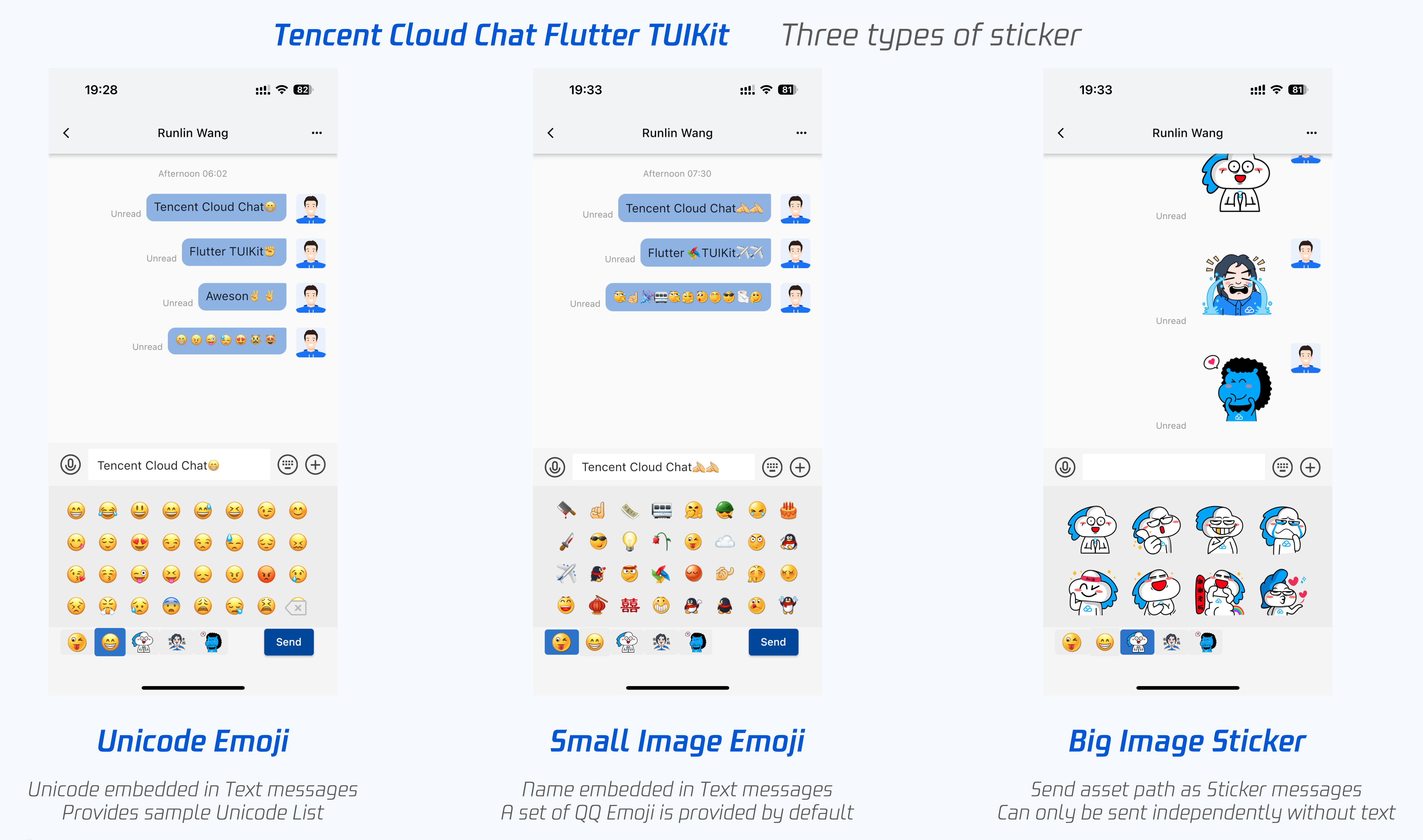
Now, let's start integrating Emoji and Sticker to your app with TUIKit.
? The usage of this module has been modified since the 1.1.0 version of TUIKit. Please check all the parts in this tutorial if you upgrade the version.
STEP 1: Customize Image Emoji and Sticker
? This step is optional: This step is necessary only if image stickers, except default QQ emoji one, includes both small and big, are needed. QQ Emoji set is provided by default, and is unnecessary to import in this step.
Import Image File to Project
Please add your image resources file to assets/custom_face_resource/ of your project, including both small and big images.
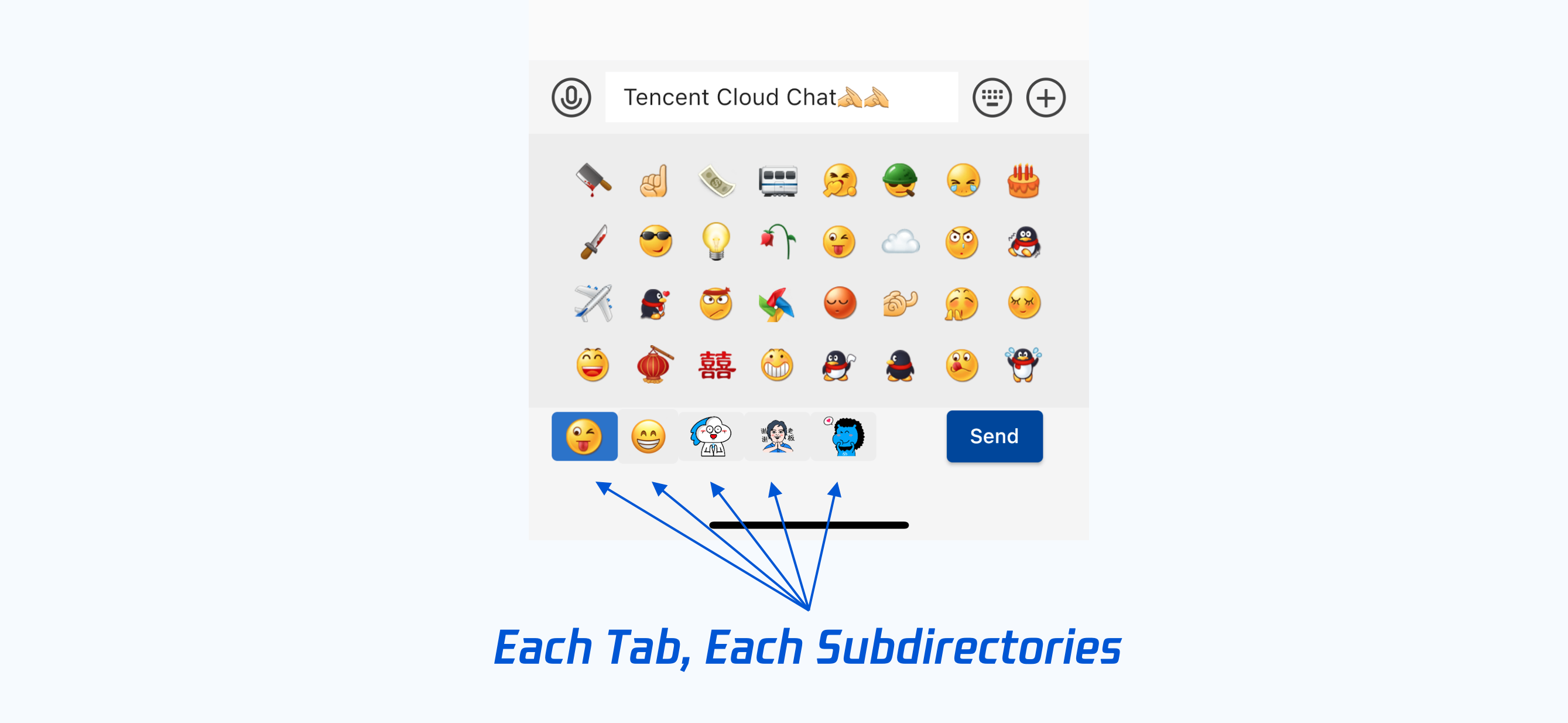
In this directory, separate subdirectory with different sticker packages, means each Tabs on Sticker panel. Only one type of sticker is allowed in each Tab(package or subdirectory).
Name those subdirectories differently, and this name will be used as the name field of CustomEmojiFaceData and CustomStickerPackage in the following steps. Please allocate the name as you need.
Also, please make sure that all image resource files do not have the same name.
You can refer to our sample project, if not clear.
Add assets to app
Open pubspec.yaml, add those following lines to flutter => assets.
flutter:
 assets:
   - assets/custom_face_resource/
Configure assets list
? The sample code for this part can be found here, mainly focused on
emojiList.
Define a static List<CustomEmojiFaceData> in your project, aiming for transferring the local image assets to TUIKit, as List.
In this List, each item is CustomEmojiFaceData, while it constitutes each Tab in the sticker panel.
CustomEmojiFaceData(
   {
       String name, // The name of the package and subdirectory.
       String icon, // The file name of the icon on the Tab.
       List<String> list, // The list of the files name.
       bool isEmoji //Whether it contains small image emojis, default is big image stickers.
   }
);
Sample Code:
static final List<CustomEmojiFaceData> emojiList = [
 // Small Image Emoji, embedded in text messages.
 CustomEmojiFaceData(
     name: '4349',
     icon: "aircraft.png",
     isEmoji: true,
     list: [
       "aircraft.png",
       "alarmClock.png",
       "anger.png",
       // ...
     ]),

 // Big image stickers, sent as sticker messages independently.
 CustomEmojiFaceData(
   name: '4350',
   icon: "menu@2x.png",
   list: [
   "yz00@2x.png",
   // ...
 ]),
]
Step 2: Customize the Unicode Emoji List
? This step is optional: This step is necessary only if Unicode Emoji is needed.
Define a static List<Map<String, Object>> of Unicode in your project, you can build it based on the sample list we provided.
You can add, delete and modify some items in this List, based on the official Unicode.
Step 3: Cache the Emoji and Sticker to memory
?
- Sample code for this step can be found here, mainly focus on
setCustomStickerfunction.- QQ Emoji has been embedded by default, and unnecessary to do this step.
Cache those Emoji and Stickers to global Provider, memory, just after your app launched, and before the first TIMUIKitChat shows.
This steps should only be done once. Aiming for reducing the load of memory IO, as rendering each sticker is a high frequency event, and will cost a lot.
The instance of each sticker is generated by the following CustomSticker class. It will show Unicode Emoji if unicode is not null, otherwise it shows an image.
class CustomSticker {
 int? unicode; // Unicode int value。It will show Unicode Emoji if this field is not null, otherwise it shows an image.
 String name; // The name of the sticker
 int index; // The index of the sticker
 bool isEmoji; // Whether it is a small image emoji, while a big image sticker is as default.
}
The instance of each Tab on sticker panel, each sticker package, is generated by the CustomStickerPackage class.
class CustomStickerPackage { // Each Tab on sticker panel, each sticker package
 String name; // The name of this sticker package, subdirectory, and the Tab.
 String? baseUrl; // Sticker package baseUrl,recommend specify as "assets/custom_face_resource/${package name}"
 List<CustomSticker> stickerList; // The list of the image files name
 CustomSticker menuItem; // The file name of the icon of Tab
 bool isEmoji; // Whether it contains small image emojis, while big image stickers are as default.
}
For the classes shown above, we provide sample codes as follows, for the code you may need to write.
Solution A shows the usage of Unicode Emoji while Solution B shows the usage of image stickers. You can choose all or part of them as needed.
setCustomSticker() async {
 // Define a list to store sticker packages.
 List<CustomStickerPackage> customStickerPackageList = [];

 // Solution A: Use Emoji Unicode list. Can be added to text messages.
 // `emojiData` comes from step 2.
 final defEmojiList = emojiData.asMap().keys.map((emojiIndex) {
   final emoji = Emoji.fromJson(emojiData[emojiIndex]);
   return CustomSticker(
       index: emojiIndex, name: emoji.name, unicode: emoji.unicode);
 }).toList();
 customStickerPackageList.add(CustomStickerPackage(
     name: "defaultEmoji",
     stickerList: defEmojiList,
     menuItem: defEmojiList[0]));

 // Solution B: Use the image sticker.
 // Please make sure `customEmojiPackage.name` is the name of the subdirectory.
 customStickerPackageList.addAll(Const.emojiList.map((customEmojiPackage) {
   return CustomStickerPackage(
       name: customEmojiPackage.name,
       baseUrl: "assets/custom_face_resource/${customEmojiPackage.name}",
       stickerList: customEmojiPackage.list
           .asMap()
           .keys
           .map((idx) =>
           CustomSticker(index: idx, name: customEmojiPackage.list[idx]))
           .toList(),
       menuItem: CustomSticker(
         index: 0,
         name: customEmojiPackage.icon,
       ));
 }).toList());

 Provider.of<CustomStickerPackageData>(context, listen: false)
     .customStickerPackageList = customStickerPackageList;
}
STEP 4: Adding those stickers to TIMUIKitChat
?
- Sample code for this step can be found here, mainly focus on
renderCustomStickerPanel,customStickerPanelandcustomEmojiList.
Copy the following codes to the class that contains the TIMUIKitChat widget directly.
Widget renderCustomStickerPanel({
 sendTextMessage,
 sendFaceMessage,
 deleteText,
 addCustomEmojiText,
 addText,
 List<CustomEmojiFaceData> defaultCustomEmojiStickerList = const [],
}) {
 final theme = Provider.of<DefaultThemeData>(context).theme;
 final customStickerPackageList =
     Provider.of<CustomStickerPackageData>(context).customStickerPackageList;
 final defaultEmojiList =
     defaultCustomEmojiStickerList.map((customEmojiPackage) {
   return CustomStickerPackage(
       name: customEmojiPackage.name,
       baseUrl: "assets/custom_face_resource/${customEmojiPackage.name}",
       isEmoji: customEmojiPackage.isEmoji,
       isDefaultEmoji: true,
       stickerList: customEmojiPackage.list
           .asMap()
           .keys
           .map((idx) =>
               CustomSticker(index: idx, name: customEmojiPackage.list[idx]))
           .toList(),
       menuItem: CustomSticker(
         index: 0,
         name: customEmojiPackage.icon,
       ));
 }).toList();
 return StickerPanel(
     sendTextMsg: sendTextMessage,
     sendFaceMsg: (index, data) =>
         sendFaceMessage(index + 1, (data.split("/")[3]).split("@")[0]),
     deleteText: deleteText,
     addText: addText,
     addCustomEmojiText: addCustomEmojiText,
     customStickerPackageList: [
       ...defaultEmojiList,
       ...customStickerPackageList
     ],
     backgroundColor: theme.weakBackgroundColor,
     lightPrimaryColor: theme.lightPrimaryColor);
}
STEP 4.1: Render Small Image Emoji
? This step is optional:
- This step is necessary only if small images emoji are needed for your app, except the QQ Emoji we provided by default.
- Unicode Emoji and small image emoji are similar, it is not recommended to integrate these two types of emoji at the same time.
- STEP 4.1(a) shows the usage of using custom small image emoji.
- STEP 4.1(b) shows the usage of using default QQ emojis.
It is recommended to choose one of them.
If you tend to use both of them, please make sure those image resource files do not have the same name.
STEP 4.1(a): Render custom small image emoji
Add a List customEmojiList field to the build function of the Widget that contains TIMUIKitChat, storing the list of small image emoji.
List customEmojiList =
   Const.emojiList.where((element) => element.isEmoji == true).toList();
And transferring this list to customEmojiStickerList of TIMUIKitChat.
return TIMUIKitChat(
   customEmojiStickerList: customEmojiList,
   // ......
);
? If this widget is a
StatefulWidget, choosing to place this list to state, and execute thewheremethod once, to improve the performance are recommended.
STEP 4.1(b): Enable QQ Emoji
Enable the isUseDefaultEmoji of TIMUIKitChatConfig from TIMUIKitChat to true. Meanwhile, a Tab shows the default QQ Emoji will occur on the left of the sticker panel.
return TIMUIKitChat(
   config: TIMUIKitChatConfig(
       isUseDefaultEmoji: true,
       // ......
   ),
   // ......
);

STEP 4.2: Add the sticker panel to TIMUIKitChat
Transfer the function, you copied in this step, to the customStickerPanel field of TIMUIKitChat.
return TIMUIKitChat(
   customStickerPanel: renderCustomStickerPanel,
   // ......
);
That's all you need to integrate Emoji and Sticker modules to your app, with Tencent Cloud Chat Flutter TUIKit.
Appendix: Sample list of Emoji Unicodes
The list is for sample and presentation purposes only, you can modify it as you need.
List<Map<String, Object>> emojiData = [
  {"name": "GRINNING FACE WITH SMILING EYES", "unicode": 128513},
  {"name": "FACE WITH TEARS OF JOY", "unicode": 128514},
  {"name": "SMILING FACE WITH OPEN MOUTH", "unicode": 128515},
  {"name": "SMILING FACE WITH OPEN MOUTH AND SMILING EYES", "unicode": 128516},
  {"name": "SMILING FACE WITH OPEN MOUTH AND COLD SWEAT", "unicode": 128517},
  {
    "name": "SMILING FACE WITH OPEN MOUTH AND TIGHTLY-CLOSED EYES",
    "unicode": 128518
  },
  {"name": "WINKING FACE", "unicode": 128521},
  {"name": "SMILING FACE WITH SMILING EYES", "unicode": 128522},
  {"name": "FACE SAVOURING DELICIOUS FOOD", "unicode": 128523},
  {"name": "RELIEVED FACE", "unicode": 128524},
  {"name": "SMILING FACE WITH HEART-SHAPED EYES", "unicode": 128525},
  {"name": "SMIRKING FACE", "unicode": 128527},
  {"name": "UNAMUSED FACE", "unicode": 128530},
  {"name": "FACE WITH COLD SWEAT", "unicode": 128531},
  {"name": "PENSIVE FACE", "unicode": 128532},
  {"name": "CONFOUNDED FACE", "unicode": 128534},
  {"name": "FACE THROWING A KISS", "unicode": 128536},
  {"name": "KISSING FACE WITH CLOSED EYES", "unicode": 128538},
  {"name": "FACE WITH STUCK-OUT TONGUE AND WINKING EYE", "unicode": 128540},
  {
    "name": "FACE WITH STUCK-OUT TONGUE AND TIGHTLY-CLOSED EYES",
    "unicode": 128541
  },
  {"name": "DISAPPOINTED FACE", "unicode": 128542},
  {"name": "ANGRY FACE", "unicode": 128544},
  {"name": "POUTING FACE", "unicode": 128545},
  {"name": "CRYING FACE", "unicode": 128546},
  {"name": "PERSEVERING FACE", "unicode": 128547},
  {"name": "FACE WITH LOOK OF TRIUMPH", "unicode": 128548},
  {"name": "DISAPPOINTED BUT RELIEVED FACE", "unicode": 128549},
  {"name": "FEARFUL FACE", "unicode": 128552},
  {"name": "WEARY FACE", "unicode": 128553},
  {"name": "SLEEPY FACE", "unicode": 128554},
  {"name": "TIRED FACE", "unicode": 128555},
  {"name": "LOUDLY CRYING FACE", "unicode": 128557},
  {"name": "FACE WITH OPEN MOUTH AND COLD SWEAT", "unicode": 128560},
  {"name": "FACE SCREAMING IN FEAR", "unicode": 128561},
  {"name": "ASTONISHED FACE", "unicode": 128562},
  {"name": "FLUSHED FACE", "unicode": 128563},
  {"name": "DIZZY FACE", "unicode": 128565},
  {"name": "FACE WITH MEDICAL MASK", "unicode": 128567},
  {"name": "GRINNING CAT FACE WITH SMILING EYES", "unicode": 128568},
  {"name": "CAT FACE WITH TEARS OF JOY", "unicode": 128569},
  {"name": "SMILING CAT FACE WITH OPEN MOUTH", "unicode": 128570},
  {"name": "SMILING CAT FACE WITH HEART-SHAPED EYES", "unicode": 128571},
  {"name": "CAT FACE WITH WRY SMILE", "unicode": 128572},
  {"name": "KISSING CAT FACE WITH CLOSED EYES", "unicode": 128573},
  {"name": "POUTING CAT FACE", "unicode": 128574},
  {"name": "CRYING CAT FACE", "unicode": 128575},
  {"name": "WEARY CAT FACE", "unicode": 128576},
  {"name": "FACE WITH NO GOOD GESTURE", "unicode": 128581},
  {"name": "FACE WITH OK GESTURE", "unicode": 128582},
  {"name": "PERSON BOWING DEEPLY", "unicode": 128583},
  {"name": "SEE-NO-EVIL MONKEY", "unicode": 128584},
  {"name": "HEAR-NO-EVIL MONKEY", "unicode": 128585},
  {"name": "SPEAK-NO-EVIL MONKEY", "unicode": 128586},
  {"name": "HAPPY PERSON RAISING ONE HAND", "unicode": 128587},
  {"name": "PERSON RAISING BOTH HANDS IN CELEBRATION", "unicode": 128588},
  {"name": "PERSON FROWNING", "unicode": 128589},
  {"name": "PERSON WITH POUTING FACE", "unicode": 128590},
  {"name": "PERSON WITH FOLDED HANDS", "unicode": 128591},
  {"name": "BLACK SCISSORS", "unicode": 9986},
  {"name": "WHITE HEAVY CHECK MARK", "unicode": 9989},
  {"name": "AIRPLANE", "unicode": 9992},
  {"name": "ENVELOPE", "unicode": 9993},
  {"name": "RAISED FIST", "unicode": 9994},
  {"name": "RAISED HAND", "unicode": 9995},
  {"name": "VICTORY HAND", "unicode": 9996},
  {"name": "PENCIL", "unicode": 9999},
  {"name": "BLACK NIB", "unicode": 10002},
  {"name": "HEAVY CHECK MARK", "unicode": 10004},
  {"name": "HEAVY MULTIPLICATION X", "unicode": 10006},
  {"name": "SPARKLES", "unicode": 10024},
  {"name": "EIGHT SPOKED ASTERISK", "unicode": 10035},
  {"name": "EIGHT POINTED BLACK STAR", "unicode": 10036},
  {"name": "SNOWFLAKE", "unicode": 10052},
  {"name": "SPARKLE", "unicode": 10055},
  {"name": "CROSS MARK", "unicode": 10060},
  {"name": "NEGATIVE SQUARED CROSS MARK", "unicode": 10062},
  {"name": "BLACK QUESTION MARK ORNAMENT", "unicode": 10067},
  {"name": "WHITE QUESTION MARK ORNAMENT", "unicode": 10068},
  {"name": "WHITE EXCLAMATION MARK ORNAMENT", "unicode": 10069},
  {"name": "HEAVY EXCLAMATION MARK SYMBOL", "unicode": 10071},
  {"name": "HEAVY BLACK HEART", "unicode": 10084},
  {"name": "HEAVY PLUS SIGN", "unicode": 10133},
  {"name": "HEAVY MINUS SIGN", "unicode": 10134},
  {"name": "HEAVY DIVISION SIGN", "unicode": 10135},
  {"name": "BLACK RIGHTWARDS ARROW", "unicode": 10145},
  {"name": "CURLY LOOP", "unicode": 10160},
  {"name": "ROCKET", "unicode": 128640},
  {"name": "RAILWAY CAR", "unicode": 128643},
  {"name": "HIGH-SPEED TRAIN", "unicode": 128644},
  {"name": "HIGH-SPEED TRAIN WITH BULLET NOSE", "unicode": 128645},
  {"name": "METRO", "unicode": 128647},
  {"name": "STATION", "unicode": 128649},
  {"name": "BUS", "unicode": 128652},
  {"name": "BUS STOP", "unicode": 128655},
  {"name": "AMBULANCE", "unicode": 128657},
  {"name": "FIRE ENGINE", "unicode": 128658},
  {"name": "POLICE CAR", "unicode": 128659},
  {"name": "TAXI", "unicode": 128661},
  {"name": "AUTOMOBILE", "unicode": 128663},
  {"name": "RECREATIONAL VEHICLE", "unicode": 128665},
  {"name": "DELIVERY TRUCK", "unicode": 128666},
  {"name": "SHIP", "unicode": 128674},
  {"name": "SPEEDBOAT", "unicode": 128676},
  {"name": "HORIZONTAL TRAFFIC LIGHT", "unicode": 128677},
  {"name": "CONSTRUCTION SIGN", "unicode": 128679},
  {"name": "POLICE CARS REVOLVING LIGHT", "unicode": 128680},
  {"name": "TRIANGULAR FLAG ON POST", "unicode": 128681},
  {"name": "DOOR", "unicode": 128682},
  {"name": "NO ENTRY SIGN", "unicode": 128683},
  {"name": "SMOKING SYMBOL", "unicode": 128684},
  {"name": "NO SMOKING SYMBOL", "unicode": 128685},
  {"name": "BICYCLE", "unicode": 128690},
  {"name": "PEDESTRIAN", "unicode": 128694},
  {"name": "MENS SYMBOL", "unicode": 128697},
  {"name": "WOMENS SYMBOL", "unicode": 128698},
  {"name": "RESTROOM", "unicode": 128699},
  {"name": "BABY SYMBOL", "unicode": 128700},
  {"name": "TOILET", "unicode": 128701},
  {"name": "WATER CLOSET", "unicode": 128702},
  {"name": "BATH", "unicode": 128704},
  {"name": "CIRCLED LATIN CAPITAL LETTER M", "unicode": 9410},
  {"name": "NEGATIVE SQUARED LATIN CAPITAL LETTER A", "unicode": 127344},
  {"name": "NEGATIVE SQUARED LATIN CAPITAL LETTER B", "unicode": 127345},
  {"name": "NEGATIVE SQUARED LATIN CAPITAL LETTER O", "unicode": 127358},
  {"name": "NEGATIVE SQUARED LATIN CAPITAL LETTER P", "unicode": 127359},
  {"name": "NEGATIVE SQUARED AB", "unicode": 127374},
  {"name": "SQUARED CL", "unicode": 127377},
  {"name": "SQUARED COOL", "unicode": 127378},
  {"name": "SQUARED FREE", "unicode": 127379},
  {"name": "SQUARED ID", "unicode": 127380},
  {"name": "SQUARED NEW", "unicode": 127381},
];
Contact Us
If there's anything unclear or you have more ideas, feel free to contact us!
- Telegram Group: https://t.me/+1doS9AUBmndhNGNl
- WhatsApp Group: https://chat.whatsapp.com/Gfbxk7rQBqc8Rz4pzzP27A