TUIKit has Chat SDK, UI components and basic business logic inside. You can choose our pure Chat SDK tencent-cloud-chat-sdk if you tend to build the UI yourself.
## Experience DEMO
You can experience our Chat and Voice/Video Call modules via the following demos.
**Those following versions of demo has been build by the same Flutter project with our SDKs and extensions.**
Mobile APP
WEB - H5
[Recommend] iOS/Android APP
Scan for the Web DEMO
**Also, taking a look of the screenshots of TUIKit from [here](https://www.tencentcloud.com/document/product/1047/50059?from=pub) are suggested.**
## Introduction to TUIKit
[TUIKit](https://www.tencentcloud.com/document/product/1047/50059?from=pub) is a set of official UI components for Tencent Cloud Chat SDK, with chat business logic around it. It provides components such as the conversation, chat, relationship chain, and group.
You can use these UI components to build your APP with the In-APP chat module quickly and easily.
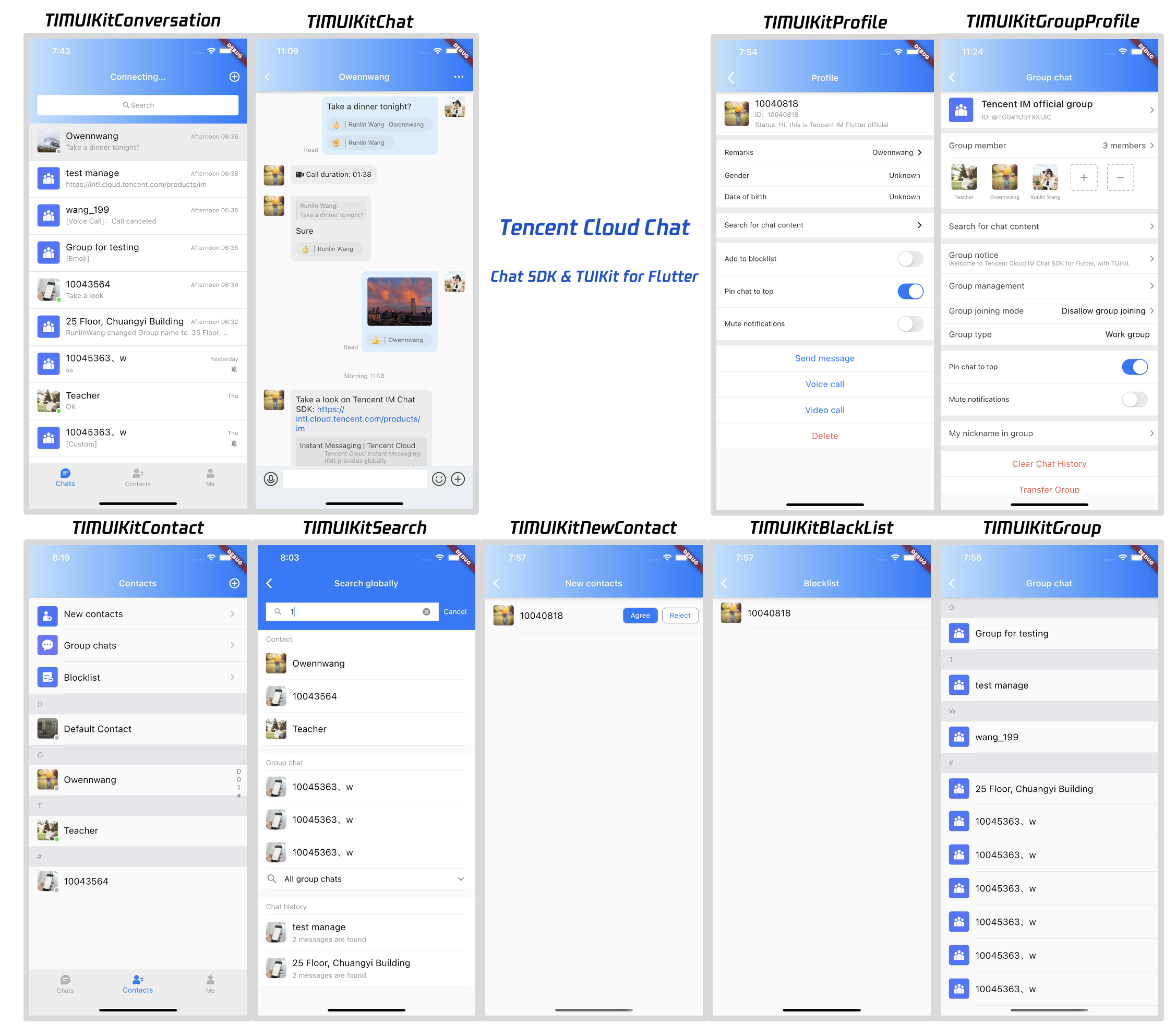
Currently, Flutter [TUIKit](https://www.tencentcloud.com/document/product/1047/50059?from=pub) contains the following main components:
- [TIMUIKitCore](https://comm.qq.com/im/doc/flutter/en/TUIKit/TIMUIKitCore/readme.html): Core entry
- [TIMUIKitConversation](https://www.tencentcloud.com/document/product/1047/50059?from=pub#timuikitconversation): Conversation list
- [TIMUIKitChat](https://www.tencentcloud.com/document/product/1047/50059?from=pub#timuikitchat): Chat module, includes historical message list and message sending area, with some other features like message reaction and URL preview, etc.
- [TIMUIKitContact](https://www.tencentcloud.com/document/product/1047/50059?from=pub#relationship-chain-components): Contacts list
- [TIMUIKitProfile](https://www.tencentcloud.com/document/product/1047/50059?from=pub#timuikitprofile): User profile and relationship management
- [TIMUIKitGroupProfile](https://www.tencentcloud.com/document/product/1047/50059?from=pub#timuikitgroupprofile): Group profile and management
- [TIMUIKitGroup](https://www.tencentcloud.com/document/product/1047/50059?from=pub#relationship-chain-components): The list of group self joined
- [TIMUIKitBlackList](https://www.tencentcloud.com/document/product/1047/50059?from=pub#relationship-chain-components): The list of user been blocked
- [TIMUIKitNewContact](https://www.tencentcloud.com/document/product/1047/50059?from=pub#relationship-chain-components): New contacts application list
- [TIMUIKitSearch](https://www.tencentcloud.com/document/product/1047/50036?from=pub): Search globally
- [TIMUIKitSearchMsgDetail](https://www.tencentcloud.com/document/product/1047/50036?from=pub): Search in specific conversation
Also, there are some other useful components and widgets, that can help to build your APP, and meet your business needs, including group entry application list and group member list, etc.
For the source code of the project in the figure above, see [chat-demo-flutter](https://github.com/TencentCloud/chat-demo-flutter). The project is open source and can be used directly.
### Supported Platforms
- Android
- iOS
- Web(After version of 0.1.4)
### What's more
In addition to Flutter SDK & TUIKit, we have numerous SDKs that covering all platforms. The following platforms can communicate with each other and provide services across devices and platforms.
[**chat-uikit-android**](https://github.com/TencentCloud/chat-uikit-android)
[**chat-uikit-ios**](https://github.com/TencentCloud/chat-uikit-ios)
[**chat-uikit-vue**](https://github.com/TencentCloud/chat-uikit-vue)
[**chat-uikit-react**](https://github.com/TencentCloud/chat-uikit-react)
[**chat-uikit-uniapp**](https://github.com/TencentCloud/chat-uikit-uniapp)
[**chat-uikit-wechat**](https://github.com/TencentCloud/chat-uikit-wechat)
## Get Started
**[Please refer this documents](https://www.tencentcloud.com/document/product/1047/45907?from=pub), for a completed and detailed get started guide.**
## Directions
The following guide describes how to use Flutter TUIKit to build a simple Chat APP quickly.
**You may refer to the appendix, if willing to know about the detail and parameter for each widgets.**
> If you tend to add this Flutter [TUIKit](https://www.tencentcloud.com/document/product/1047/50059?from=pub) to your existing application directly, you may refer to [this documentation](https://www.tencentcloud.com/document/product/1047/51456). Add the Flutter module to your existing app, coding once and deploying to all platforms. It could reduce your workload, to adding chat and call modules to your existing, to a large extent.
### Step 0. Create two accounts for testing
[Signed up](https://www.tencentcloud.com/document/product/378/17985?from=pub) and [log in](https://www.tencentcloud.com/document/product/378/36004?from=pub) to the [Tencent IM console](https://console.tencentcloud.com/im?from=pub).
[Create an application](https://www.tencentcloud.com/document/product/1047/34577?from=pub) and enter in.
Select [Auxiliary Tools](https://console.tencentcloud.com/im-detail/tool-usersig?from=pub) > UserSig Generation and Verification on the left sidebar. Generate two pairs of "UserID" and the corresponding "UserSig", and copy the "key" information. [Refer to here.](https://www.tencentcloud.com/document/product/1047/34580?from=pub#usersig-generation-and-verification)
Tips: You may create "user1" and "user2" here.
> Note:
>
> The correct `UserSig` distribution method is to integrate the calculation code of `UserSig` into your server and provide an application-oriented API. When `UserSig` is needed, your application can send a request to the business server for a dynamic `UserSig`. For more information, see [How do I calculate UserSig on the server?](https://www.tencentcloud.com/document/product/1047/34385?from=pub).
### Step 1. Create a Flutter app and add permission configuration
Quickly create a Flutter APP by referring to [Flutter documentation](https://docs.flutter.dev/get-started/install).
TUIKit needs the permissions of shooting/album/recording/network for basic messaging function. You need to declare in the permission manually to use the relevant capabilities normally.
#### Android
Open `android/app/src/main/AndroidManifest.xml`, add the following lines between `` and ``.
```xml
```
#### iOS
Open `ios/Podfile`, add the following lines to the end of the file.
```pod
post_install do |installer|
installer.pods_project.targets.each do |target|
flutter_additional_ios_build_settings(target)
target.build_configurations.each do |config|
config.build_settings['GCC_PREPROCESSOR_DEFINITIONS'] ||= [
'$(inherited)',
'PERMISSION_MICROPHONE=1',
'PERMISSION_CAMERA=1',
'PERMISSION_PHOTOS=1',
]
end
end
end
```
### Step 2. Install dependencies
Add `tencent_cloud_chat_uikit` under `dependencies` in the `pubspec.yaml` file, or run the following command:
```shell
flutter pub add tencent_cloud_chat_uikit
```
It supports Android and iOS as default, if you are also willing to use it on the Web, please refer to the following guide.
#### Web Supports
Version of 0.1.4 or later are required for web supports.
> If your existing Flutter project does not support Web, run `flutter create .` in the project root directory to add web support.
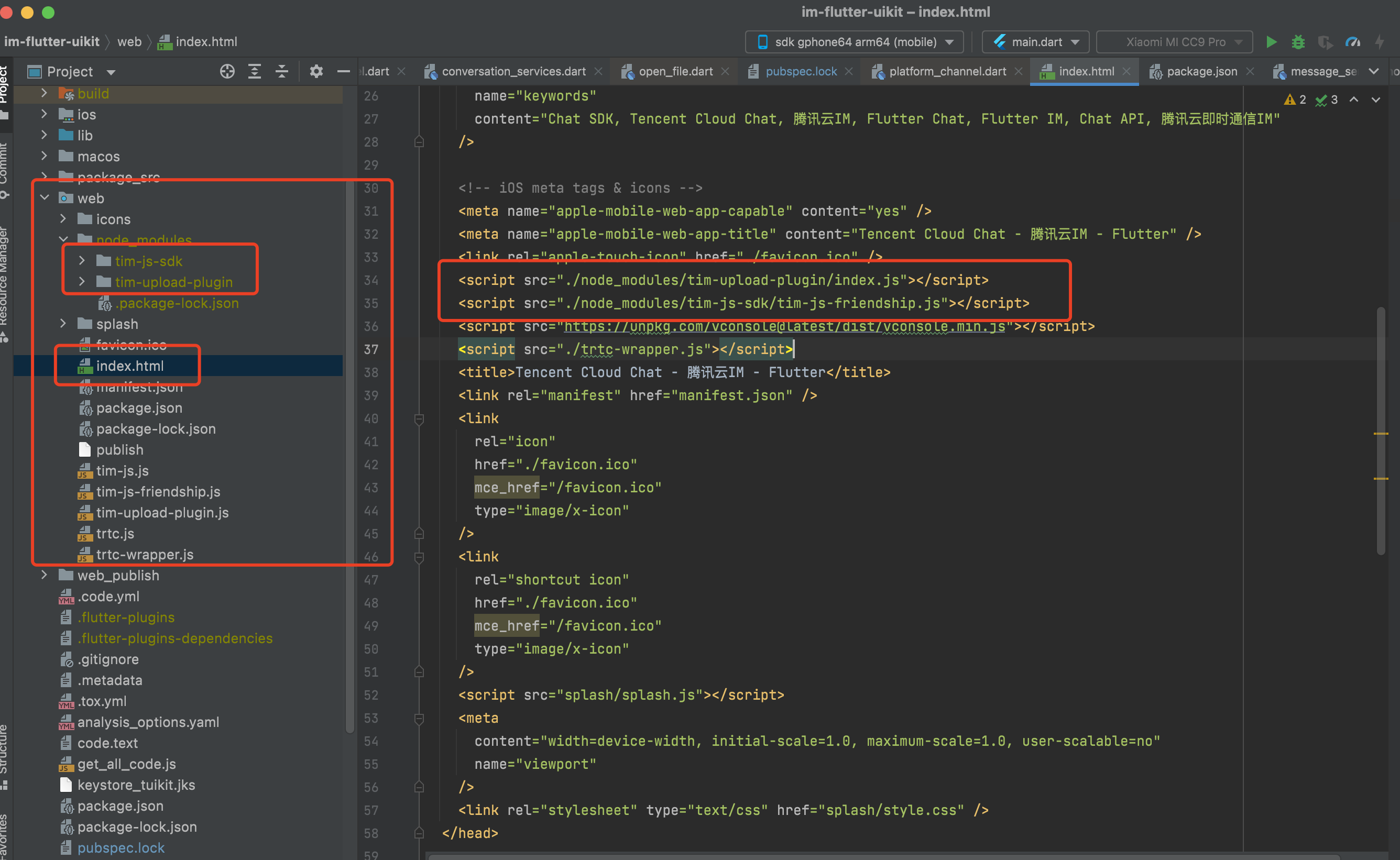
Install JS dependencies to `web/` by `npm` or `yarn`.
```shell
cd web
npm init
npm i tim-js-sdk
npm i tim-upload-plugin
```
Open `web/index.html` , add the following two lines between `` and `` to import them.
```html
```
### Step 3. Initialize TUIKit
Initialize the TUIKit after you app starts.You only need to perform the initialization once for the project to start.
Get the instance of TUIKit first by `TIMUIKitCore.getInstance()`, followed by initializing it, `init()`, with your 'sdkAppID'.
```dart
/// main.dart
import 'package:tencent_cloud_chat_uikit/tencent_cloud_chat_uikit.dart';
final CoreServicesImpl _coreInstance = TIMUIKitCore.getInstance();
@override
void initState() {
_coreInstance.init(
sdkAppID: 0, // Replace 0 with the SDKAppID of your IM application
loglevel: LogLevelEnum.V2TIM_LOG_DEBUG,
listener: V2TimSDKListener());
super.initState();
}
}
```
> **You may also better to register a callback function for `onTUIKitCallbackListener` here, please refer to the appendix.**
### Step 4. Get the signature and log in
Now, you can log in one of the testing accounts, generated on Step 0, to start the IM module.
Log in by `_coreInstance.login` .
```dart
/// main.dart
import 'package:tencent_cloud_chat_uikit/tencent_cloud_chat_uikit.dart';
final CoreServicesImpl _coreInstance = TIMUIKitCore.getInstance();
_coreInstance.login(userID: userID, userSig: userSig);
```
Caveat: Importing UserSig to your application is ONLY for Debugging purposes and cannot be applied for the Release version. Before publishing your app, you should generate your UserSig from your server. Refers to:
### Step 5. Implementing the conversation list page
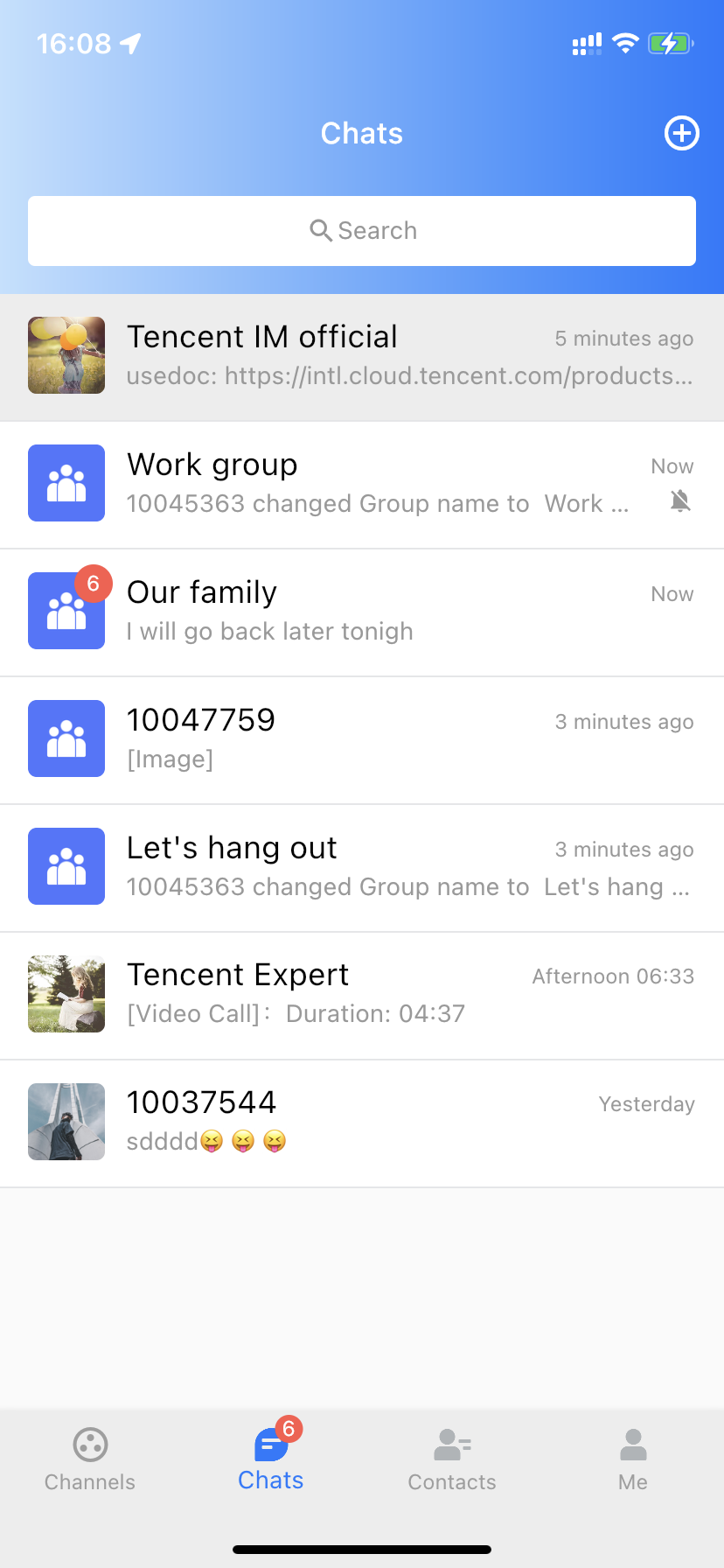
You can take the conversation (channel) list page as the homepage of your Chat module, covering the conversation with all users and groups that have chat records.
You can create a `Conversation` class, with `TIMUIKitConversation` on its `body`, to render the conversation list.
The only parameter you need to provide at least is `onTapItem` callback, aimed at navigating to the Chat page for each conversation. The `Chat` class will be introduced in the next step.
```dart
import 'package:flutter/material.dart';
import 'package:tencent_cloud_chat_uikit/tencent_cloud_chat_uikit.dart';
class Conversation extends StatelessWidget {
const Conversation({Key? key}) : super(key: key);
@override
Widget build(BuildContext context) {
return Scaffold(
appBar: AppBar(
title: const Text(
"Message",
style: TextStyle(color: Colors.black),
),
),
body: TIMUIKitConversation(
onTapItem: (selectedConv) {
Navigator.push(
context,
MaterialPageRoute(
builder: (context) => Chat(
selectedConversation: selectedConv,
),
));
},
),
);
}
}
```
### Step 6. Implementing the chat page
The chat page is composed of the main historical message list and a message sending bar at the bottom.
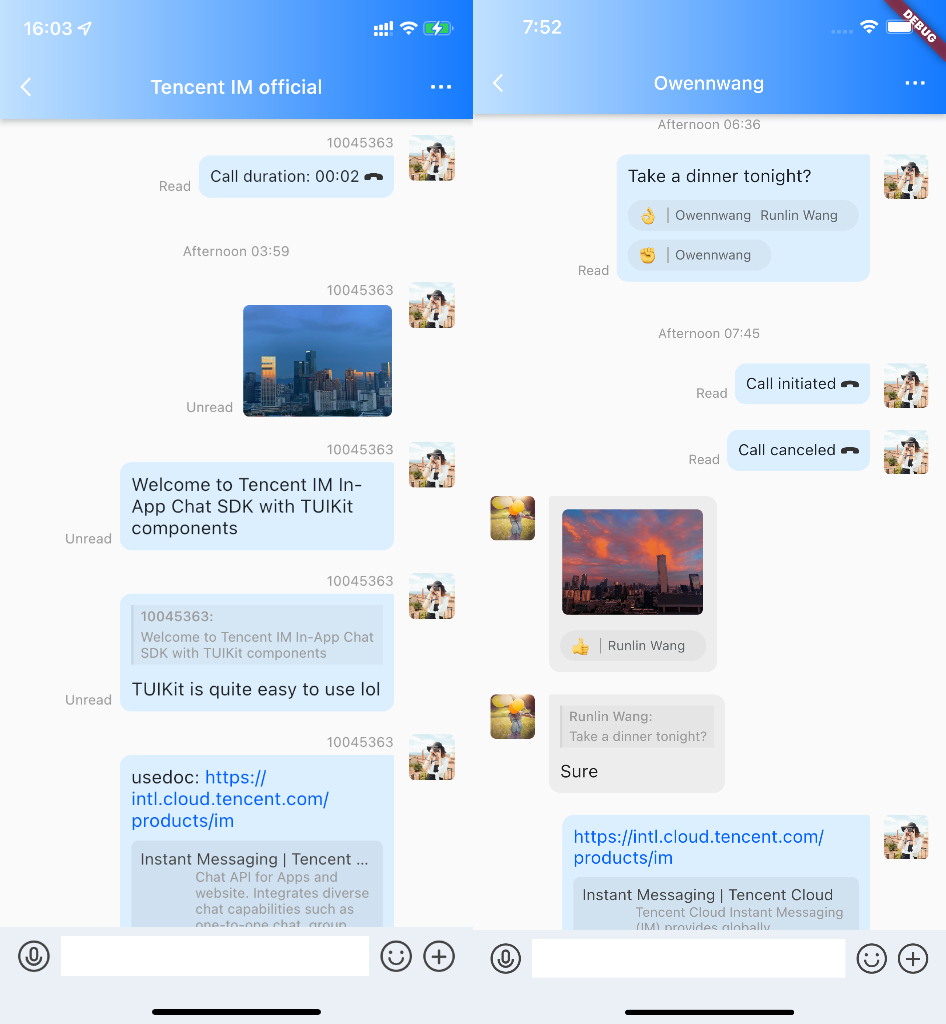
You can create a `Chat` class, with `TIMUIKitChat` on its `body`, to render the chat page.
It is recommended to provide a `onTapAvatar` callback function, for navigating to the profile page for current contact, which will be introduced in the next step.
```dart
import 'package:flutter/material.dart';
import 'package:tencent_cloud_chat_uikit/tencent_cloud_chat_uikit.dart';
class Chat extends StatelessWidget {
final V2TimConversation selectedConversation;
const Chat({Key? key, required this.selectedConversation}) : super(key: key);
String? _getConvID() {
return selectedConversation.type == 1
? selectedConversation.userID
: selectedConversation.groupID;
}
@override
Widget build(BuildContext context) {
return TIMUIKitChat(
conversationID: _getConvID() ?? '', // groupID or UserID
conversationType: selectedConversation.type ?? 1, // Conversation type
conversationShowName: selectedConversation.showName ?? "", // Conversation display name
onTapAvatar: (_) {
Navigator.push(
context,
MaterialPageRoute(
builder: (context) => UserProfile(userID: userID),
));
}, // Callback for the clicking of the message sender profile photo. This callback can be used with `TIMUIKitProfile`.
);
}
```
### Step 7. Implementing the user profile page
This page can show the profile of a specific user and maintain the relationship between the current login user and it.
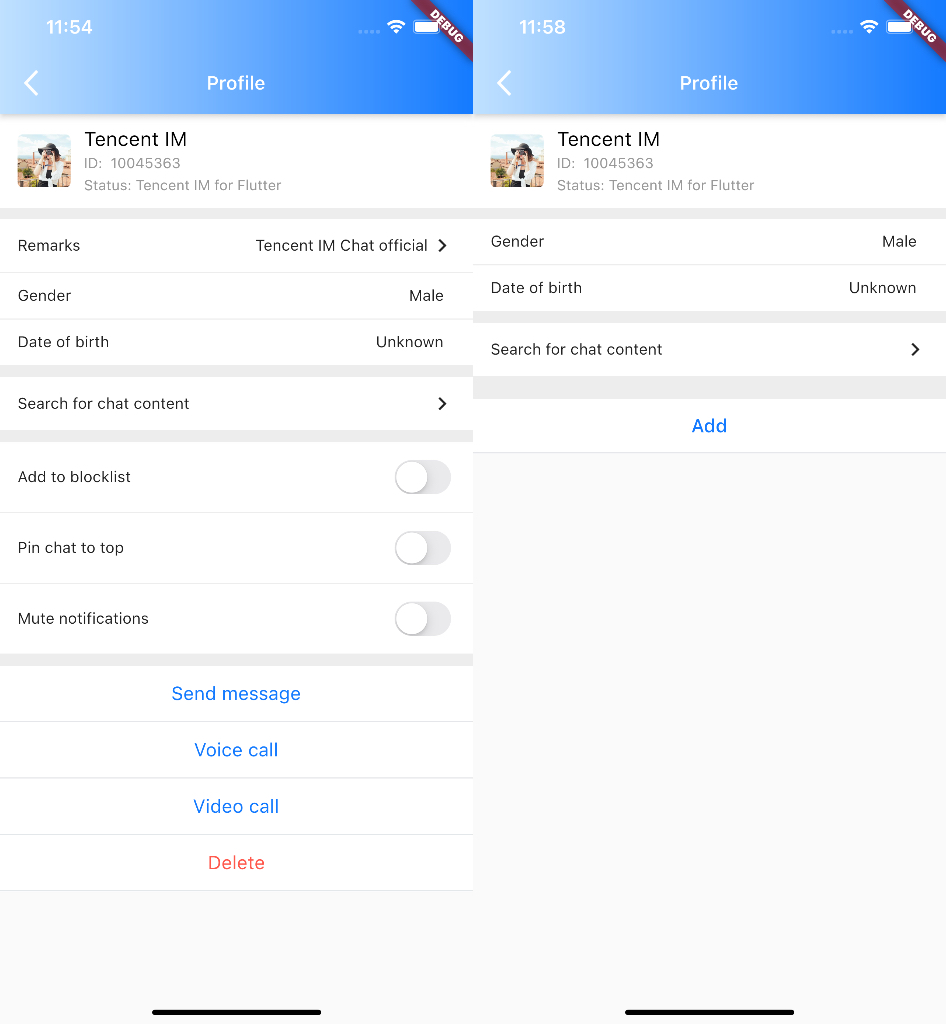
Here, you can create a `UserProfile` class, with `TIMUIKitProfile` on its `body`, to render the profile page.
The only parameter you have to provide at least is 'userID', while this component can generate the profile and relationship maintenance page based on the existence of friendship automatically.
> TIPS
>
> Please give priority to use `profileWidgetBuilder`, to customize some profile widgets, with `profileWidgetsOrder`, determine the vertical sequence, if you tend to customize this page. If this method could not meet your business needs, you may consider using `builder` instead.
```dart
import 'package:flutter/material.dart';
import 'package:tencent_cloud_chat_uikit/tencent_cloud_chat_uikit.dart';
class UserProfile extends StatelessWidget {
final String userID;
const UserProfile({required this.userID, Key? key}) : super(key: key);
@override
Widget build(BuildContext context) {
return Scaffold(
appBar: AppBar(
title: const Text(
"Message",
style: TextStyle(color: Colors.black),
),
),
body: TIMUIKitProfile(
userID: widget.userID,
),
);
}
}
```
Now, your app can send/receive messages, show the conversation list, and deal with the contact friendship.
You can use others components from TUIKit continually to implement the complete Chat module quickly and easily.
## FAQs
### Do I need to integrate Chat SDK after integrating TUIKit?
No. You don't need to integrate Chat SDK again. If you want to use Chat SDK related APIs, you can get them via `TIMUIKitCore.getSDKInstance()`. This method is recommended to ensure Chat SDK version consistency.
### Why did force quit occur when I sent voice, image, file or other messages?
Check whether you have enabled the **camera**, **mic**, **album**, or other related permissions.
Refers to Step 1 above.
### What should I do if clicking Build And Run for an Android device triggers an error, stating no available device is found?
Check that the device is not occupied by other resources. Alternatively, click Build to generate an APK package, drag it to the simulator, and run it.
### What should I do if an error occurs during the first run for an iOS device?
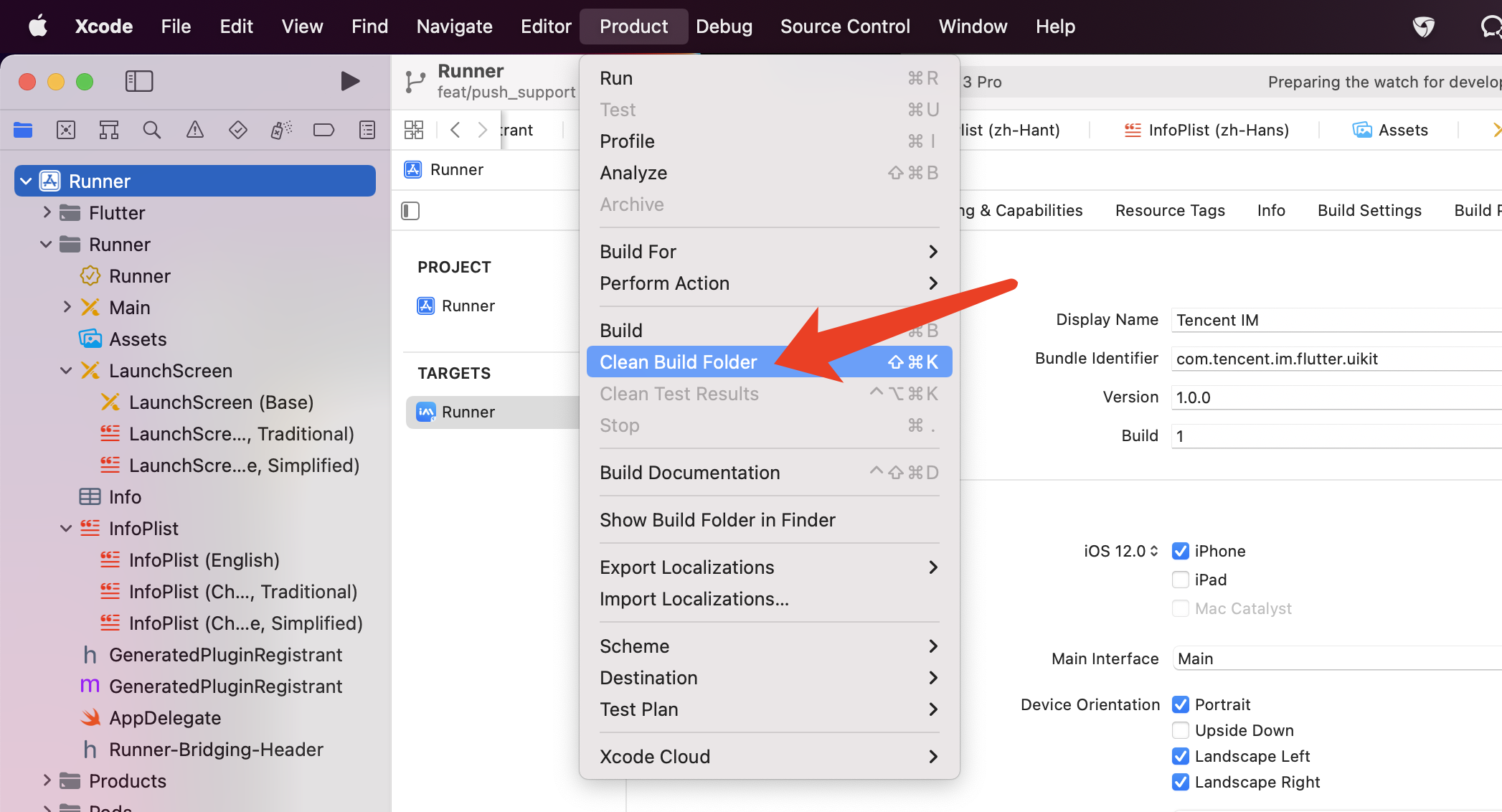
If an error occurs after the configuration, click **Product > Clean Build Folder** , clean the product, and run `pod install` or `flutter run` again.
### What should I do if an error occurs during debugging on a real iOS device when I am wearing an Apple Watch?

Turn on Airplane Mode on your Apple Watch, and go to **Settings > Bluetooth** on your iPhone to turn off Bluetooth.
Restart Xcode (if opened) and run `flutter run` again.
### Issue with Flutter environment?
If you want to check the Flutter environment, run `flutter doctor` to detect whether the Flutter environment is ready.
### What should I do when an error occurs on an Android device after TUIKit is imported into the application automatically generated by Flutter?

1. Open `android\app\src\main\AndroidManifest.xml` and complete `xmlns:tools="http://schemas.android.com/tools" / android:label="@string/android_label" / tools:replace="android:label"` as follows.
```xml
```
2. Open `android\app\build.gradle` and complete `minSdkVersion` and `targetSdkVersion` in `defaultConfig`.
```gradle
defaultConfig {
applicationId "" // Replace it with your Android package name
minSdkVersion 21
targetSdkVersion 30
}
```
---
## Contact Us
Please do not hesitate to contact us in the following place, if you have any further questions or tend to learn more about the use cases.
- Telegram Group:
- WhatsApp Group:
- QQ Group: 788910197, chat in Chinese
Our Website:
---
## Appendix: Overview for each widgets
### TIMUIKitCore
`TIMUIKitCore` provides two static methods, including `getInstance` and `getSDKInstance`。
- `getInstance`: Used for get the instance of `CoreServicesImpl`.
- `getSDKInstance`: Used for get the instance of Chat SDK.
`CoreServicesImpl` is the main class of `TUIKit` , providing the methods includes initialization, logging in and out, getting user information, etc.
```dart
import 'package:tencent_cloud_chat_uikit/tencent_cloud_chat_uikit.dart';
final CoreServicesImpl _coreInstance = TIMUIKitCore.getInstance();
final V2TIMManager _sdkInstance = TIMUIKitCore.getSDKInstance();
// init
_coreInstance.init(
language: LanguageEnum?, // Specify the displaying language among English / Chinese, Traditional / Chinese, Simplified. If this field is not provided, the default is the system language
onTUIKitCallbackListener: ValueChanged, // The callback listener for information from TUIKit, includes errors from SDK API/ the info needs to reminds users/ errors from Flutter. You can reminds users up to your business needs, the description below for details.
sdkAppID: 0, // sdkAppID from Tencent IM console
loglevel: LogLevelEnum.V2TIM_LOG_DEBUG,
listener: V2TimSDKListener());
// unInit
_coreInstance.unInit();
// login
_coreInstance.login(
userID: 0, // user ID
userSig: "" // [How do I calculate UserSig on the server?](https://www.tencentcloud.com/document/product/1047/34385?from=pub)
)
// logout
_coreInstance.logout();
// getUsersInfo
_coreInstance.getUsersInfo(userIDList: ["123", "456"]);
// setOfflinePushConfig
_coreInstance.setOfflinePushConfig(
businessID: businessID, // The business from Tencent IM console, for each platform of devices
token: token, // The token from manufactors when registering the offline push
)
// setSelfInfo
_coreInstance.setSelfInfo(userFullInfo: userFullInfo) // set self userinfo
// setTheme
_coreInstance.setTheme(TUITheme theme: theme) // set theme color
/*
TUITheme(
// Primary color
final Color? primaryColor;
// Secondary color
final Color? secondaryColor;
// Info color, for secondary operations or prompts
final Color? infoColor;
// Weak background color, lighter than the main background color, used to fill gaps or shadows
final Color? weakBackgroundColor;
// Weak divider line color, for dividing lines or borders
final Color? weakDividerColor;
// Weak text color
final Color? weakTextColor;
// Dark text color
final Color? darkTextColor;
// Used for AppBar or Panels
final Color? lightPrimaryColor;
// Text color
final Color? textColor;
// Warning color for dangerous operation
final Color? cautionColor;
// Group owner identification color
final Color? ownerColor;
// Group administrator identification color
final Color? adminColor;)
*/
```
#### `onTUIKitCallbackListener`
This listener is used to get information including: errors form SDK API / errors form Flutter / some remind information that may need to pop up to prompt users.
Determine the type by `TIMCallbackType`.
> You may refer to our [DEMO](https://github.com/TencentCloud/tc-chat-demo-flutter/lib/src/pages/app.dart) for the codes in this part, and modifying up to your business needs.
##### Errors form SDK API(`TIMCallbackType.API_ERROR`)
In this scenario, SDK API original `errorMsg` and `errorCode` are provided.
[Error codes listed here](https://www.tencentcloud.com/document/product/1047/34348?from=pub)
#### Errors form Flutter(`TIMCallbackType.FLUTTER_ERROR`)
This error is captured by listening Flutter natively throwing an exception, providing `stackTrace` (from `FlutterError.onError`) or `catchError` (from try-catch) when the error occurs.
#### Remind information(`TIMCallbackType.INFO`)
It is suggest to pup up to prompt users for this kind of messages.
Provide the `infoCode` info code to help you determine the current scene, and provide the default prompt recommendation `infoRecommendText`.
You can directly pop up our recommendations, or you can customize the recommendations according to the scene code. The language of recommendation text is adaptive according to the system language or the language you specified, do not judge the scene according to the recommendation language.
The rules for info code are as follows:
The info code consists of seven digits, the first five digits determine the components of the scene, and the last two digits determine the specific performance of the scene.
| The first five digits | Corresponding widget |
| ---------- | ---------------------- |
| 66601 | `TIMUIKitAddFriend` |
| 66602 | `TIMUIKitAddGroup` |
| 66603 | `TIMUIKitBlackList` |
| 66604 | `TIMUIKitChat` |
| 66605 | `TIMUIKitContact` |
| 66606 | `TIMUIKitConversation` |
| 66607 | `TIMUIKitGroup` |
| 66608 | `TIMUIKitGroupProfile` |
| 66609 | `TIMUIKitNewContact` |
| 66610 | `TIMUIKitGroupProfile` |
| 66611 | `TIMUIKitNewContact` |
| 66612 | `TIMUIKitProfile` |
| 66613 | `TIMUIKitSearch` |
| 66614 | General Widget |
All info codes are listed below:
| `infoCode` | Recommendation prompt `infoRecommendText` | Scene description |
| ----------------- | ------------------------------------------------------------ | ------------------------------------------------------------ |
| 6660101 | Contact request sent | User requests to add another user as a contact. |
| 6660102 | This user is your contact. | When a user applies to add another user who is already a contact, the callback of `onTapAlreadyFriendsItem` is triggered. |
| 6660201 | Group request sent | Users apply to join a group chat that requires the approval of the administrator.|
| 6660202 | You are already in this group | When a user applies to join a group, it is determined that the user is already a member of the current group, triggering the callback of `onTapExistGroup`. |
| 6660401 | Failed to locate the original message | When the user needs to jump to the @ message or reference the message, the target message is not found in the message list. |
| 6660402 | Video saved successfully | After clicking on the video message in the message list, and chooses to save the video. |
| 6660403 | Failed to save the video | After clicking on the video message in the message list, and chooses to save the video. |
| 6660404 | Message too short | The user sent an overly short voice message. |
| 6660405 | Sending failed. The video cannot exceed 100 MB. | The user attempted to send a video larger than 100MB. |
| 6660406 | Image saved successfully | After clicking on the image in the message list, the user chooses to save the picture. |
| 6660407 | Failed to save the image | After clicking on the image in the message list, the user chooses to save the picture. |
| 6660408 | Copied | The user chooses to copy the text message in the pop-up window. |
| 6660409 | Not implemented | The user selects a non-implemented function in the pop-up. window |
| 6660410 | You are receiving other files | When the user clicks the download file message, the previous download task has not yet been completed. |
| 6660411 | Receiving | User clicks to download file message. |
| 6660412 | Video is available with .mp4 only | The user sent a video message in non-mp4 format |
| 6660413 | Added to download queue and waiting | Added to the queue to be downloaded, while other files are downloading |
| 6661001 | Modification failed due to network disconnection | When users try to modify group data in a non-network environment. |
| 6661002 | Failed to view the group members due to network disconnection | When users try to modify group data in a non-network environment. |
| 6661003 | Admin role canceled successfully | The user removes the other users from the administrator in the group. |
| 6661201 | Modification failed due to network disconnection | When a user tries to modify his or her contact information without a network environment. |
| 6661202 | Added successfully | Add other users as contact on the profile page and automatically add them successfully without verification. |
| 6661203 | Request sent successfully | Add other users as contact on the profile page, and the other user's settings need to be verified. |
| 6661204 | The user is blocked | Add other users as contacts on the profile page, who are on their own blocklist. |
| 6661205 | Added failed | Add other users as contact on the profile page, but failed, probably because the other party is forbidden to add contact. |
| 6661206 | Deleted successfully | Delete other users as contact on the profile page and succeed. |
| 6661207 | Deleted failed | Delete other users as contact on the profile page. Failed. |
| 6661401 | The input cannot be empty | When the user is entering information, an empty string is entered. |
| 6661402 | Please provide a life cycle hook navigating back to home or other pages. | When users quit the group or dissolve the group, they did not provide a way to return to the home page. |
| 6661403 | Insufficient disk storage space, it is recommended to clean up to obtain a better experience | After the login is successful, the device storage space will be automatically detected. If there is less than 1GB, it will be prompted. |
### TIMUIKitConversation
`TIMUIKitConversation` shows the conversation list.
The corresponding controller: `TIMUIKitConversationController` is also provided.
```dart
import 'package:tencent_cloud_chat_uikit/tencent_cloud_chat_uikit.dart';
final TIMUIKitConversationController _controller =
TIMUIKitConversationController();
void _handleOnConvItemTaped(V2TimConversation? selectedConv) {
// You can jump to the chat interface here.
}
List _itemSlidableBuilder(
V2TimConversation conversationItem) {
return [
ConversationItemSlidablePanel(
onPressed: (context) {
_clearHistory(conversationItem);
},
backgroundColor: hexToColor("006EFF"),
foregroundColor: Colors.white,
label: 'Clear conversaation',
autoClose: true,
),
ConversationItemSlidablePanel(
onPressed: (context) {
_pinConversation(conversationItem);
},
backgroundColor: hexToColor("FF9C19"),
foregroundColor: Colors.white,
label: conversationItem.isPinned! ? 'unpined' : 'pinned',
)
];
}
TIMUIKitConversation(
lifeCycle: ConversationLifeCycle(), // The lifecycle hook
onTapItem: _handleOnConvItemTaped, // Callback of clicking conversation, can navigating to chat page
itemSlidableBuilder: _itemSlidableBuilder, // Operation items for conversation Item sliding to the left, conversation topping, etc.
controller: _controller, // Conversation component controller, through which you can get conversation data, set conversation data, pin conversation to top and other operations
itembuilder: (conversationItem) {} // Used to customize the conversation item. Can be combined with TIMUIKitConversationController to implement business logic.
conversationCollector: (conversation) {} // Conversation collector, which can customize whether the conversation is displayed
lastMessageBuilder: (V2TimMessage, List) {} // Customize the second line of the conversation item, which is generally used to show the last message
)
```
---
### TIMUIKitChat
`TIMUIKitChat` is the main chat component that provides the display of message list and the ability to send messages.
It also supports custom display of various message types.
Additionally, it can be combined with `TIMUIKitChatController` to realize local storage and pre-rendering of messages, etc.
Currently supported message parsing:
- Text message.
- Image message.
- Video message.
- Voice message.
- Group message.
- Merge message.
- File message.
```dart
import 'package:tencent_cloud_chat_uikit/tencent_cloud_chat_uikit.dart';
TIMUIKitChat(
lifeCycle: ChatLifeCycle(), // Lifecycle hook for TIMUIKitChat
conversationID: "", // User ID or Group ID
conversationType: ConversationType, // 1 is c2c chat, 2 is group chat
conversationShowName: "",
appBarActions: [], // appBar operation item, which can be used to jump to the page of group details and personal details, etc.
onTapAvatar: _onTapAvatar, // callback function for clicking the avatar, which can be used to jump to the user profile.
messageItemBuilder: (MessageItemBuilder) {
// Message item layout constructor, you can choose to customize part of the message type or message row layout.
},
extraTipsActionItemBuilder: (message) {
// The configuration for the menu, opend by long pressed messages
},
morePanelConfig: MorePanelConfig(), // The config for more panel area
appBarConfig: AppBar(), // The config for AppBar
mainHistoryListConfig: ListView(), // Additional config for ListView of historical message list
textFieldHintText: "", // The hint of inputTextField
draftText: "", // The draft of inputting message
initFindingMsg: 0, // The message been jumped
config: TIMUIKitChatConfig(), // The config for the whole TIMUIKitChat
onDealWithGroupApplication: (String groupID){
// Navigating to the pages for the page of [TIMUIKitGroupApplicationList] or other pages to handle joining group application for specific group
}
)
```
---
### TIMUIKitProfile
`TIMUIKitProfile` shows the detail information for a user, and manage the relationship.
```dart
TIMUIKitProfile(
userID: "",
controller: TIMUIKitProfileController(), // Profile Controller
profileWidgetBuilder: ProfileWidgetBuilder(), // Customized some kinds of item.
profileWidgetsOrder: List, // Determine the vertical sequence for those profile widgets.
builder: (
BuildContext context,
V2TimFriendInfo friendInfo,
V2TimConversation conversation,
int friendType,
bool isMute) {
// Customized the whole page. `profileWidgetBuilder` and `profileWidgetsOrder` will no longer works if you define this.
},
lifeCycle: ProfileLifeCycle(),// Lifecycle hook for TIMUIKitProfile
)
```
---
### TIMUIKitGroupProfile
`TIMUIKitGroupProfile` shows the details of a group and can manage this group.
```dart
TIMUIKitGroupProfile(
groupID: "",
profileWidgetBuilder: GroupProfileWidgetBuilder(), // Customized some kinds of item.
profileWidgetsOrder: List, // Determine the vertical sequence for those profile widgets.
builder: (BuildContext context, V2TimGroupInfo groupInfo, List groupMemberList){
// Customized the whole page. `profileWidgetBuilder` and `profileWidgetsOrder` will no longer works if you define this.
},
lifeCycle: GroupProfileLifeCycle, // Lifecycle hook for TIMUIKitGroupProfile
)
```
---
### TIMUIKitBlackList
`TIMUIKitBlackList` shows the list of blocked users.
```dart
TIMUIKitBlackList(
onTapItem: (_) {}, // Callback of clicking the item
emptyBuilder: () {} // The builder when no user listed
itemBuilder: () {} // Customized the user item
lifeCycle: BlockListLifeCycle(), // Lifecycle hook for TIMUIKitBlackList
)
```
---
### TIMUIKitGroup
`TIMUIKitGroup` shows the list of joined group.
```dart
TIMUIKitGroup(
onTapItem: (_) {}, // Callback of clicking the item
emptyBuilder: () {} // The builder when no group listed
itemBuilder: () {} // Customized the group item
)
```
---
### TIMUIKitContact
`TIMUIKitContact` shows the list of contacts.
```dart
import 'package:tencent_cloud_chat_uikit/tencent_cloud_chat_uikit.dart';
TIMUIKitContact(
lifeCycle: FriendListLifeCycle(), // Lifecycle hook for TIMUIKitContact
topList: [
TopListItem(name: "New Contact", id: "newContact"),
TopListItem(name: "Group", id: "groupList"),
TopListItem(name: "Blocklist", id: "blackList")
], // Top list array
topListItemBuilder: _topListBuilder, // The builder for top list array
onTapItem: (item) { }, // Callback of clicking a contact
emptyBuilder: (context) => const Center(
child: Text("No cantact"),
), // The builder when no contact listed
);
```
### TIMUIKitSearch
`TIMUIKitSearch` is a global search widget. Global search supports search for "contacts" / "groups" / "chat records".
`TIMUIKitSearchMsgDetail` is an intra-conversation search component that can search for chat records for a specific conversation.
```dart
import 'package:tencent_cloud_chat_uikit/tencent_cloud_chat_uikit.dart';
// Search globally
TIMUIKitSearch(
onTapConversation: _handleOnConvItemTapedWithPlace, // Function(V2TimConversation, V2TimMessage? message), navigating to specific message from specific conversation
onEnterConversation: (V2TimConversation conversation, String initKeyword){}, // Navigating to search in specific conversation. Please navigate to TIMUIKitSearchMsgDetail manually
);
// Search inside a specific conversation
TIMUIKitSearchMsgDetail(
currentConversation: conversation!,
onTapConversation: onTapConversation,
keyword: initKeyword ?? "",
);
```
## Contact Us
Please do not hesitate to contact us in the following place, if you have any further questions or tend to learn more about the use cases.
- Telegram Group:
- WhatsApp Group:
- QQ Group: 788910197, chat in Chinese
Our Website:



 You can create a `Conversation` class, with `TIMUIKitConversation` on its `body`, to render the conversation list.
The only parameter you need to provide at least is `onTapItem` callback, aimed at navigating to the Chat page for each conversation. The `Chat` class will be introduced in the next step.
```dart
import 'package:flutter/material.dart';
import 'package:tencent_cloud_chat_uikit/tencent_cloud_chat_uikit.dart';
class Conversation extends StatelessWidget {
const Conversation({Key? key}) : super(key: key);
@override
Widget build(BuildContext context) {
return Scaffold(
appBar: AppBar(
title: const Text(
"Message",
style: TextStyle(color: Colors.black),
),
),
body: TIMUIKitConversation(
onTapItem: (selectedConv) {
Navigator.push(
context,
MaterialPageRoute(
builder: (context) => Chat(
selectedConversation: selectedConv,
),
));
},
),
);
}
}
```
### Step 6. Implementing the chat page
The chat page is composed of the main historical message list and a message sending bar at the bottom.

You can create a `Chat` class, with `TIMUIKitChat` on its `body`, to render the chat page.
It is recommended to provide a `onTapAvatar` callback function, for navigating to the profile page for current contact, which will be introduced in the next step.
```dart
import 'package:flutter/material.dart';
import 'package:tencent_cloud_chat_uikit/tencent_cloud_chat_uikit.dart';
class Chat extends StatelessWidget {
final V2TimConversation selectedConversation;
const Chat({Key? key, required this.selectedConversation}) : super(key: key);
String? _getConvID() {
return selectedConversation.type == 1
? selectedConversation.userID
: selectedConversation.groupID;
}
@override
Widget build(BuildContext context) {
return TIMUIKitChat(
conversationID: _getConvID() ?? '', // groupID or UserID
conversationType: selectedConversation.type ?? 1, // Conversation type
conversationShowName: selectedConversation.showName ?? "", // Conversation display name
onTapAvatar: (_) {
Navigator.push(
context,
MaterialPageRoute(
builder: (context) => UserProfile(userID: userID),
));
}, // Callback for the clicking of the message sender profile photo. This callback can be used with `TIMUIKitProfile`.
);
}
```
### Step 7. Implementing the user profile page
This page can show the profile of a specific user and maintain the relationship between the current login user and it.

Here, you can create a `UserProfile` class, with `TIMUIKitProfile` on its `body`, to render the profile page.
The only parameter you have to provide at least is 'userID', while this component can generate the profile and relationship maintenance page based on the existence of friendship automatically.
> TIPS
>
> Please give priority to use `profileWidgetBuilder`, to customize some profile widgets, with `profileWidgetsOrder`, determine the vertical sequence, if you tend to customize this page. If this method could not meet your business needs, you may consider using `builder` instead.
```dart
import 'package:flutter/material.dart';
import 'package:tencent_cloud_chat_uikit/tencent_cloud_chat_uikit.dart';
class UserProfile extends StatelessWidget {
final String userID;
const UserProfile({required this.userID, Key? key}) : super(key: key);
@override
Widget build(BuildContext context) {
return Scaffold(
appBar: AppBar(
title: const Text(
"Message",
style: TextStyle(color: Colors.black),
),
),
body: TIMUIKitProfile(
userID: widget.userID,
),
);
}
}
```
Now, your app can send/receive messages, show the conversation list, and deal with the contact friendship.
You can use others components from TUIKit continually to implement the complete Chat module quickly and easily.
## FAQs
### Do I need to integrate Chat SDK after integrating TUIKit?
No. You don't need to integrate Chat SDK again. If you want to use Chat SDK related APIs, you can get them via `TIMUIKitCore.getSDKInstance()`. This method is recommended to ensure Chat SDK version consistency.
### Why did force quit occur when I sent voice, image, file or other messages?
Check whether you have enabled the **camera**, **mic**, **album**, or other related permissions.
Refers to Step 1 above.
### What should I do if clicking Build And Run for an Android device triggers an error, stating no available device is found?
Check that the device is not occupied by other resources. Alternatively, click Build to generate an APK package, drag it to the simulator, and run it.
### What should I do if an error occurs during the first run for an iOS device?
If an error occurs after the configuration, click **Product > Clean Build Folder** , clean the product, and run `pod install` or `flutter run` again.

### What should I do if an error occurs during debugging on a real iOS device when I am wearing an Apple Watch?

Turn on Airplane Mode on your Apple Watch, and go to **Settings > Bluetooth** on your iPhone to turn off Bluetooth.
Restart Xcode (if opened) and run `flutter run` again.
### Issue with Flutter environment?
If you want to check the Flutter environment, run `flutter doctor` to detect whether the Flutter environment is ready.
### What should I do when an error occurs on an Android device after TUIKit is imported into the application automatically generated by Flutter?

1. Open `android\app\src\main\AndroidManifest.xml` and complete `xmlns:tools="http://schemas.android.com/tools" / android:label="@string/android_label" / tools:replace="android:label"` as follows.
```xml
You can create a `Conversation` class, with `TIMUIKitConversation` on its `body`, to render the conversation list.
The only parameter you need to provide at least is `onTapItem` callback, aimed at navigating to the Chat page for each conversation. The `Chat` class will be introduced in the next step.
```dart
import 'package:flutter/material.dart';
import 'package:tencent_cloud_chat_uikit/tencent_cloud_chat_uikit.dart';
class Conversation extends StatelessWidget {
const Conversation({Key? key}) : super(key: key);
@override
Widget build(BuildContext context) {
return Scaffold(
appBar: AppBar(
title: const Text(
"Message",
style: TextStyle(color: Colors.black),
),
),
body: TIMUIKitConversation(
onTapItem: (selectedConv) {
Navigator.push(
context,
MaterialPageRoute(
builder: (context) => Chat(
selectedConversation: selectedConv,
),
));
},
),
);
}
}
```
### Step 6. Implementing the chat page
The chat page is composed of the main historical message list and a message sending bar at the bottom.

You can create a `Chat` class, with `TIMUIKitChat` on its `body`, to render the chat page.
It is recommended to provide a `onTapAvatar` callback function, for navigating to the profile page for current contact, which will be introduced in the next step.
```dart
import 'package:flutter/material.dart';
import 'package:tencent_cloud_chat_uikit/tencent_cloud_chat_uikit.dart';
class Chat extends StatelessWidget {
final V2TimConversation selectedConversation;
const Chat({Key? key, required this.selectedConversation}) : super(key: key);
String? _getConvID() {
return selectedConversation.type == 1
? selectedConversation.userID
: selectedConversation.groupID;
}
@override
Widget build(BuildContext context) {
return TIMUIKitChat(
conversationID: _getConvID() ?? '', // groupID or UserID
conversationType: selectedConversation.type ?? 1, // Conversation type
conversationShowName: selectedConversation.showName ?? "", // Conversation display name
onTapAvatar: (_) {
Navigator.push(
context,
MaterialPageRoute(
builder: (context) => UserProfile(userID: userID),
));
}, // Callback for the clicking of the message sender profile photo. This callback can be used with `TIMUIKitProfile`.
);
}
```
### Step 7. Implementing the user profile page
This page can show the profile of a specific user and maintain the relationship between the current login user and it.

Here, you can create a `UserProfile` class, with `TIMUIKitProfile` on its `body`, to render the profile page.
The only parameter you have to provide at least is 'userID', while this component can generate the profile and relationship maintenance page based on the existence of friendship automatically.
> TIPS
>
> Please give priority to use `profileWidgetBuilder`, to customize some profile widgets, with `profileWidgetsOrder`, determine the vertical sequence, if you tend to customize this page. If this method could not meet your business needs, you may consider using `builder` instead.
```dart
import 'package:flutter/material.dart';
import 'package:tencent_cloud_chat_uikit/tencent_cloud_chat_uikit.dart';
class UserProfile extends StatelessWidget {
final String userID;
const UserProfile({required this.userID, Key? key}) : super(key: key);
@override
Widget build(BuildContext context) {
return Scaffold(
appBar: AppBar(
title: const Text(
"Message",
style: TextStyle(color: Colors.black),
),
),
body: TIMUIKitProfile(
userID: widget.userID,
),
);
}
}
```
Now, your app can send/receive messages, show the conversation list, and deal with the contact friendship.
You can use others components from TUIKit continually to implement the complete Chat module quickly and easily.
## FAQs
### Do I need to integrate Chat SDK after integrating TUIKit?
No. You don't need to integrate Chat SDK again. If you want to use Chat SDK related APIs, you can get them via `TIMUIKitCore.getSDKInstance()`. This method is recommended to ensure Chat SDK version consistency.
### Why did force quit occur when I sent voice, image, file or other messages?
Check whether you have enabled the **camera**, **mic**, **album**, or other related permissions.
Refers to Step 1 above.
### What should I do if clicking Build And Run for an Android device triggers an error, stating no available device is found?
Check that the device is not occupied by other resources. Alternatively, click Build to generate an APK package, drag it to the simulator, and run it.
### What should I do if an error occurs during the first run for an iOS device?
If an error occurs after the configuration, click **Product > Clean Build Folder** , clean the product, and run `pod install` or `flutter run` again.

### What should I do if an error occurs during debugging on a real iOS device when I am wearing an Apple Watch?

Turn on Airplane Mode on your Apple Watch, and go to **Settings > Bluetooth** on your iPhone to turn off Bluetooth.
Restart Xcode (if opened) and run `flutter run` again.
### Issue with Flutter environment?
If you want to check the Flutter environment, run `flutter doctor` to detect whether the Flutter environment is ready.
### What should I do when an error occurs on an Android device after TUIKit is imported into the application automatically generated by Flutter?

1. Open `android\app\src\main\AndroidManifest.xml` and complete `xmlns:tools="http://schemas.android.com/tools" / android:label="@string/android_label" / tools:replace="android:label"` as follows.
```xml